Starting a Conversation on WhatsApp: 5 Ways to Make Customers Message You
Get customers to start conversations on WhatsApp by giving them clear reasons to message your business.
 by Sahil Tyagi
Getting customers to start a WhatsApp conversation means creating inbound entry points that make it effortless for customers to send the first message. Inbound conversations convert at higher rates than outbound broadcasts because the customer already has specific intent. Plus, every customer-initiated message opens a 24-hour window where your business can respond with free-form messages.
- The entry points to generate inbound conversations are:
- Click-to-WhatsApp ads on Facebook and Instagram
- A WhatsApp chat widget on high-intent website pages
- WhatsApp QR codes on packaging and physical touchpoints
- A WhatsApp link in social media bios
- WhatsApp-exclusive offers that require messaging to redeem
WhatsApp's 3+ billion active users don't just use the platform to talk to their friends. They use it to ask questions before buying and request support after a purchase from businesses they trust. Brands capturing that intent are the ones whose contact details are easy to find and whose entry points make it effortless to start a conversation.
WhatsApp has shifted from an outbound broadcast channel to a two-way commerce engine. In fact, 66% of consumers make a purchase after interacting with a brand on WhatsApp. The question isn't whether your customers want to message you. It is whether you have made it easy enough for them to start.
Additionally, Click-to-WhatsApp Ads spend grew 82% year over year between 2025 and 2026 globally. That growth signals that businesses across every category are realizing that the most valuable customer interaction isn't a click to a landing page, it is a conversation. And conversations on WhatsApp convert at much higher rates than most digital channels can match.
Having said that, getting customers to initiate those conversations requires more than just having a WhatsApp number. You need correct entry points placed at the right positions that make it easy for customers to use it.
That's why in this guide, I'll explain to you the proven ways to get customers to start a conversation on WhatsApp.
What does "starting a conversation on WhatsApp" mean for businesses?
Starting a conversation on WhatsApp in a business context refers to a customer sending the first message to your WhatsApp number. It can either be done through a direct link, a QR code, an ad, or a WhatsApp chat widget.
This is the inbound side of WhatsApp communication. And because the customer chose to reach out, their intent is higher, with the interaction being governed by different rules than outbound broadcast campaigns.
Under WhatsApp's current policy, businesses can only send outbound messages using pre-approved message templates to contacts who have opted in. Once a customer sends the first message, a 24-hour conversation window opens in which the business can respond freely with any content. This is why inbound conversations are so commercially valuable.
Inbound vs. outbound WhatsApp conversations
Outbound WhatsApp messages are business-initiated. You are the one to send a message template to opted-in contacts, which usually involves promotions, reminders, or transactional updates. The customer receives the message whether or not they were actively thinking about your product.
On the other hand, inbound conversations are customer-initiated. The customer reached out because they have a specific question or intent right now. This active intent is what makes inbound conversations convert at higher rates. A customer who messages you is significantly closer to a purchase than a customer who received a promotional broadcast.
Building a system that generates consistent inbound conversation volume is one of the highest-ROI investments in WhatsApp marketing because you are capturing demand that already exists rather than creating it from scratch.
| Aspect | Inbound WhatsApp Conversations | Outbound WhatsApp Conversations |
|---|---|---|
| Who starts it? | The customer starts the conversation. | The business starts the conversation. |
| Primary purpose | Usually involves support, inquiries, or product questions. | Usually involves marketing, sales, reminders, or updates. |
| Customer intent | Customers already show interest or have a specific need. | Customers may not be actively looking to engage. |
| Message type | Responses can usually be conversational and reactive. | Businesses typically use approved message templates to initiate contact. |
| Best suited for | Customer support, lead qualification, and query resolution. | Campaigns, promotions, re-engagement, and notifications. |
| Conversation window | A customer message can open a customer service window for replies. | Businesses generally need a reply to continue the conversation. |
| Conversion potential | Often higher because the customer has already shown intent. | Depends heavily on targeting, timing, and message relevance. |
Why do inbound WhatsApp conversations drive better business outcomes?
When it comes to building a sustainable WhatsApp engagement strategy, inbound conversations offer advantages that outbound campaigns can't replicate. Here are a few reasons you should actively invest in generating them:
Higher purchase intent at point of contact
Customers who initiate a WhatsApp conversation are already in an active decision-making state. They have a specific question, a price concern, a product doubt, or a buying intent they need resolved before they commit.
This translates directly to conversion rates that outperform outbound campaigns. According to Forrester, Click-to-WhatsApp ads, for example, drive inbound conversations to deliver 94% higher conversion rates and 92% lower cost per lead compared to traditional ad formats.
The customers who click through aren't browsing passively but are actively looking to engage. For teams managing WhatsApp sales pipelines, this intent advantage means less time spent qualifying and more time spent closing. A customer who starts the conversation has already done the first qualification step themselves.
A 24-hour window for unrestricted conversation
Every WhatsApp conversation started by a customer opens a 24-hour service window in which you can respond with free-form messages that include text, images, videos, catalogs, payment links, and voice notes, without needing pre-approved templates.
This flexibility with free-form WhatsApp messages is significant. A WhatsApp marketing message is constrained to what the template allows. A customer-led conversation lets you share personalized messages to impact purchase decisions in real time. The quality of the interaction possible within that 24-hour window is meaningfully higher than anything a template message can achieve.
If you are running WhatsApp marketing automation, inbound conversations also trigger automated flows that can qualify the customer and start a structured sequence, all within the same conversation window the customer opened.
Put this Service Window to Work.
Auto-qualify and route every inbound WhatsApp chat the second it opens.
Start FreeNo opt-in friction before the conversation starts
WhatsApp marketing campaigns require explicit WhatsApp opt-in from every contact before you can send them a template. Building that opt-in list takes time, and the friction involved in getting customers to formally subscribe can significantly limit your reachable audience.
Inbound conversations have no such requirement.
When a customer scans a QR code or taps a click-to-chat link, they are opting in through their action. There's no need for them to fill out a separate subscription form before they can begin receiving messages from you.
On top of that, customers who start conversations self-segment by interest and intent. For instance, a customer who taps your WhatsApp widget on your pricing page has different intent from one who scans a QR code on a product package. These natural segments are some of the most valuable inputs for WhatsApp customer segmentation strategies that follow the initial conversation.
Better conversion rates than traditional channels
When a customer has a question about your product, they can either email you, fill out a contact form, call your support line, or message you on WhatsApp. The first three options involve waiting, meanwhile, WhatsApp is immediate.
Websites with WhatsApp chat widgets see up to 45% higher conversion rates than those without. The conversion lift comes from removing the waiting period between a customer's question and your answer. When the gap between intent and resolution closes, purchase decisions don't get deferred to later.
Tracking these outcomes through your customer engagement metrics will show the direct relationship between inbound conversation volume and conversion rate.
5 ways to get customers starting a conversation on WhatsApp
Now that you have a solid understanding of why inbound WhatsApp conversations matter, let's get into the specific methods you can use to generate them. Each of these strategies creates a different type of entry point, targeted at a different moment in the customer's journey:
Run Click-to-WhatsApp Ads on Facebook and Instagram
Click-to-WhatsApp ads are Meta ad formats that replace the standard advertisements mediums with one that opens a WhatsApp conversation directly when tapped. A customer sees your ad in their Facebook or Instagram feed, taps the WhatsApp button, and lands inside a conversation with your business number.
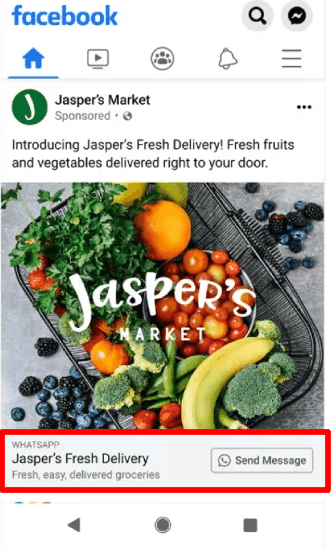
This format outperforms standard click-to-website ads on two aspects that matter:
- Click-through rate
- Post-click conversion
Click-to-WhatsApp ads achieve a 3% to 6% average click-through rate, roughly two to three times the rate of standard link ads. In addition to that, 35-55% of the customers who click actually start a conversation. The drop-off that normally happens between an ad click and a landing page form is removed because the action required from the customer is a single tap.
The most effective way to set these up is to pair the ad with a pre-filled opening message. Meta allows you to configure a default message that appears in the customer's chat before they hit send. For example, a message like "I'd like to know more about your pricing options" gives you insight into the customer's current stage.
This pre-fill reduces the blank-screen hesitation some customers feel when a conversation opens and are not sure what to write. It also gives you or your chatbot a clean starting point to respond to.
For targeting, your highest-performing CTWA audiences are typically customers who have visited your product pages without purchasing or customers in your email list who haven't opened recent emails. These segments have the right balance of familiarity with your brand and unresolved intent.
Add a WhatsApp chat widget to your website
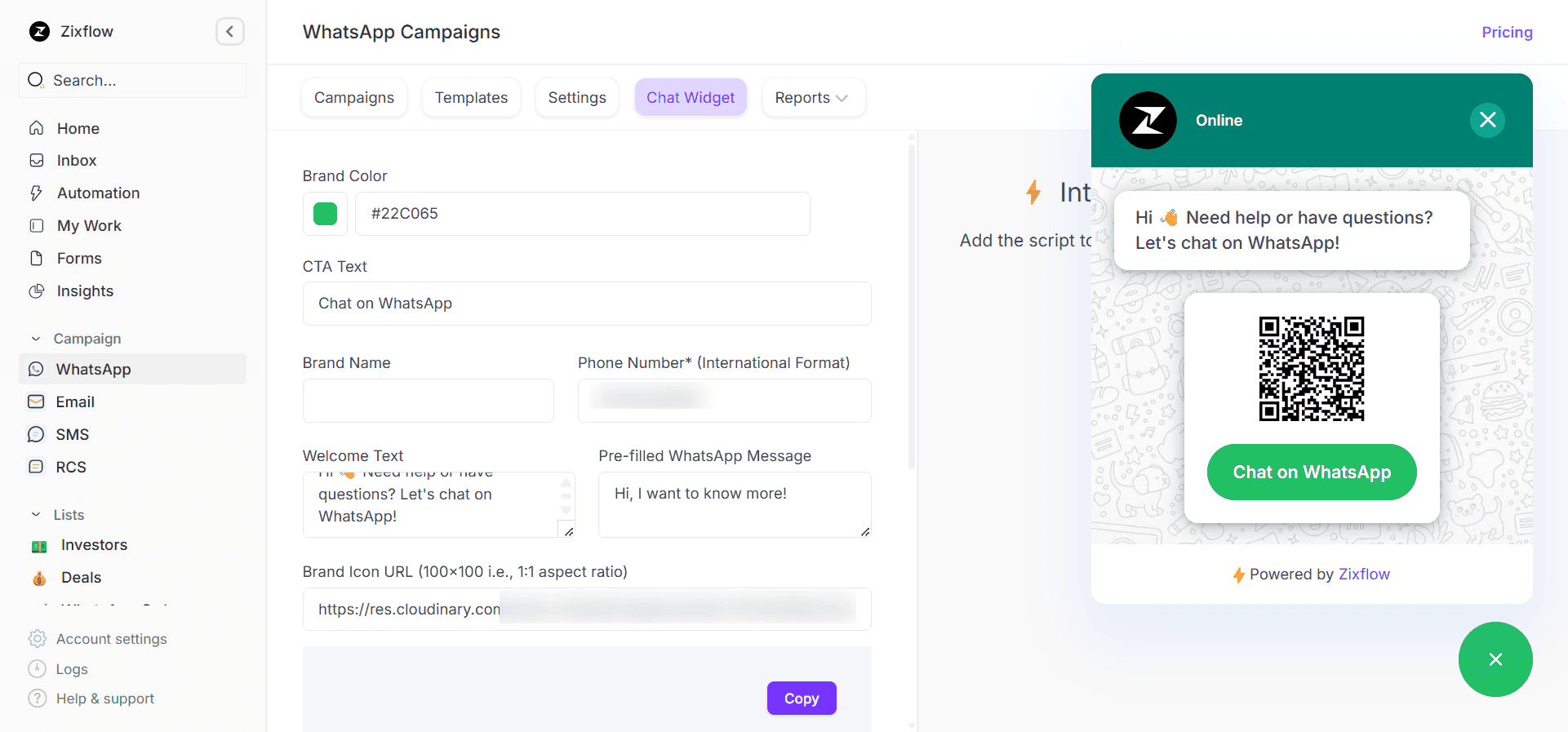
A WhatsApp chat widget is a floating button, typically placed in the bottom corner of your website, that opens a WhatsApp conversation when clicked on mobile or generates a QR code or link on desktop. It turns every page of your website into a potential conversation entry point.
The placement of this widget matters more than most businesses realize. A widget that floats on every page of your site is a low-intent entry point by catching visitors who happen to notice it. A widget placed specifically on your high-conversion pages is a high-intent entry point. It catches visitors who are actively evaluating a decision. Both have value, but the high-intent placements produce conversations that are closer to conversion.
From a technical standpoint, the widget is a simple embed that many WhatsApp API providers offer as a one-line HTML snippet or a no-code plugin for Shopify, WordPress, or WooCommerce.
Setup typically takes less than 30 minutes. The more involved work is optimizing the placement, the accompanying message, and the automated reply that greets customers when they open the conversation. Most businesses start with a basic install and optimize from there based on which pages generate the highest conversation volume.
Skip the Trial and Error.
See how Zixflow sets up and fine-tunes WhatsApp widgets for teams like yours.
Book a DemoUse WhatsApp QR codes across different touchpoints
A WhatsApp QR code is a scannable code that opens a pre-configured WhatsApp conversation when scanned with a smartphone camera. WhatsApp Business natively generates these codes, and they can be customized to include a pre-filled message so the customer's opening line is already written when the conversation starts.
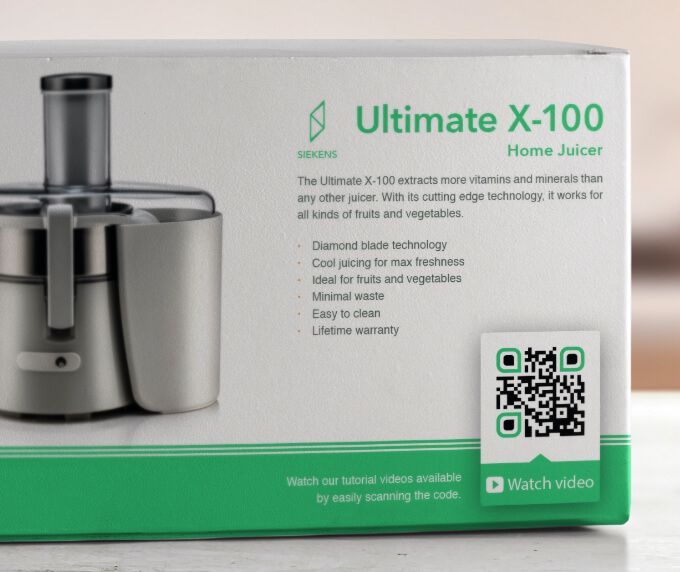
QR codes work in contexts where a clickable link isn't possible. They bridge the gap between a physical customer interaction and a WhatsApp conversation in a way no other mechanism does. A customer who just bought a product can scan the QR code on the box to register or ask a question without typing a number or finding a website.
The crucial factor in making QR codes generate conversations rather than just scans is giving the customer a specific reason to scan. Having an incentive needs to be visible on the material next to the code, because the customer makes the decision to scan before they see what happens after.
For e-commerce brands, the highest-value QR code placements are post-purchase packaging, physical retail locations, and printed promotional materials distributed at events. Each of these touchpoints catches the customer at a moment of natural engagement with your brand, which makes the WhatsApp conversation feel like a logical next step rather than an interruption.
Feature your WhatsApp number on social media
Your social media presence is already generating awareness among people who are considering your brand. Most of that awareness converts to nothing because the path from "interested" to "in conversation with your team" requires too many steps. Adding your WhatsApp link directly to your Instagram bio, LinkedIn profile, Facebook page, and X profile removes those steps.
Social media bios are permanently visible to your customers. A click-to-WhatsApp link in your Instagram bio means every piece of organic content you post has a conversion path attached to it. Someone who watches your product demo on Instagram and wants to know the price doesn't need to find your website. They tap the bio link and they are in a conversation.
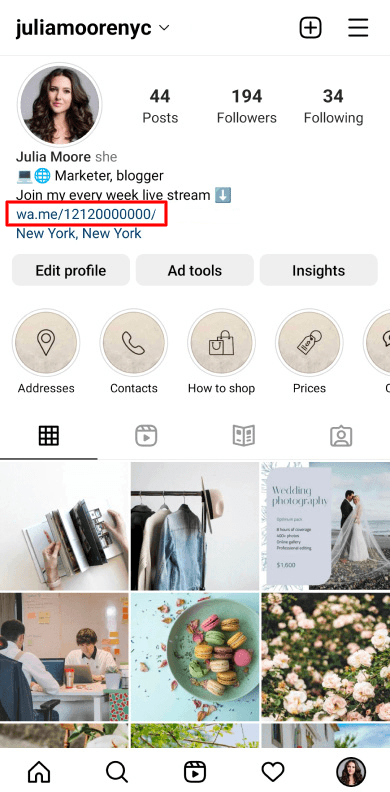
For content teams, the integration between organic posts and WhatsApp conversations also creates a natural feedback loop for customer engagement measurement. You can track which content types drive the most WhatsApp conversation volume, which gives you a direct line between your organic social investment and the inbound pipeline it generates.
Offer WhatsApp-exclusive deals to drive first messages
One of the most direct ways to generate inbound WhatsApp conversations is to give customers a specific reason to message you. It could be a discount, early access, a free resource, or an exclusive offer available only through WhatsApp. The exclusivity creates urgency, and the requirement turns the redemption process itself into a conversation.
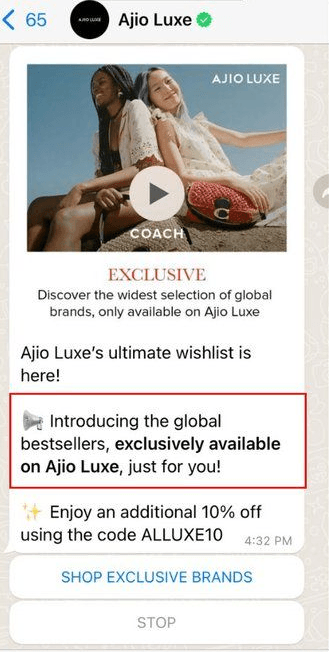
The mechanism to do this is straightforward. An ad or a physical flyer promotes an offer that is accessible only by messaging a WhatsApp number. The customer messages to claim the deal with you, or an automated chatbot responds with the offer details to convert them within the same conversation.
Since the customer came in with a specific intent, the offer structure matters the most here. For example, percentage discounts work well for e-commerce companies with high-volume SKUs. Exclusive early access works well for product launches. Free consultations work well for B2B services.
The key is that the offer needs to be compelling enough to create action and specific enough that the customer knows exactly what they are going to get when they message you. Vague incentives don't convert as well as concrete ones.
Get customers to message you on WhatsApp to boost meaningful interactions
In this guide, I have covered the core entry points for generating inbound WhatsApp conversations. Each creates a different type of entry point at a different moment in the customer's journey, but together they build a system where starting a conversation on WhatsApp feels natural for the customer.
The most important thing to understand about inbound conversation strategy is that it is a compounding system. Every entry point you add generates more conversations, which leads to building a richer customer profile that ultimately results in higher conversion chances.
Businesses that generate consistent inbound volume across multiple touchpoints don't just get more leads. They get a self-improving understanding of what their customers need and when they are most ready to buy.
So, if you are just getting started, the fastest path to meaningful inbound volume is to add a WhatsApp widget to your highest-traffic pages and put a WhatsApp QR code in easy-to-notice places. I wouldn’t jump straight into running Click-to-WhatsApp ads, as they require careful budget considerations before they drive impactful returns.
For brands that want to manage inbound WhatsApp conversations at scale and route them to the right team member automatically, Zixflow's WhatsApp functionality covers all of it. You can start a free trial and see how it fits into your existing workflow.
Frequently asked questions about starting conversations on WhatsApp
How do I get customers to start a conversation on WhatsApp?
The most effective methods are Click-to-WhatsApp Ads on Facebook and Instagram, a WhatsApp chat widget on your website, WhatsApp QR codes on your packaging, a WhatsApp link inside your email campaigns, and WhatsApp-exclusive offers that give customers a specific reason to message you.
Each method works best at a different moment in the customer journey, so a combination of two or three entry points deployed simultaneously generates more consistent conversation volume than any single method alone.
What is a Click-to-WhatsApp ad and how does it work?
A Click-to-WhatsApp Ad is an advertisement format on Facebook or Instagram where the call-to-action button opens a WhatsApp conversation with your business instead of redirecting to a landing page.
When a customer taps the button, a pre-configured WhatsApp conversation opens with your business number. You can set a default pre-filled message so the customer's opening line is already written.
Can I send the first WhatsApp message to a customer?
Yes, but only using pre-approved message templates sent to contacts who have explicitly opted in to receive WhatsApp communications from your business.
These outbound template messages are used for promotions, reminders, and transactional updates. If you want to start a free-form conversation, you need the customer to send the first message or reply to one of your messages. Once they do, you can respond with any content within a 24-hour service window.
What is a WhatsApp click-to-chat link and how do I create one?
A WhatsApp click-to-chat link is a URL that opens a WhatsApp conversation with your business number when clicked. You can add a pre-filled message to the URL so the conversation opens with a default first message already typed for the customer.
WhatsApp Business generates these links natively, and most WhatsApp Business Solution Providers offer a link generator tool. Place these links anywhere you want customers to be able to reach you.
How do WhatsApp QR codes work for businesses?
A WhatsApp QR code is a scannable code generated by WhatsApp Business that opens a conversation with your number when scanned by a smartphone camera. You can configure it to include a pre-filled message so the customer's opening line is already written.
WhatsApp Business accounts generate QR codes in the app settings. For the WhatsApp Business API, your WhatsApp tool can generate the code.
How do I track which entry point is generating the most WhatsApp conversations?
The most reliable method is to use a different WhatsApp link or pre-filled message for each entry point, then track conversation volume per source in your WhatsApp provider's analytics.
For example, suppose your website widget generates a conversation and so does your ad campaign and your email link. By tagging each channel with a different attribute at source, you can calculate the cost per conversation and conversion rate for each entry point separately.