How to Add a WhatsApp Chat Widget to your Website in 2026?
A WhatsApp chat widget lets website visitors contact your business directly, with simple setup and customization for different websites.
 by Sahil Tyagi
A WhatsApp chat widget is a floating button embedded on your website that, when clicked, opens a WhatsApp conversation between the visitor and your business with a pre-filled opening message ready to send.
Unlike contact forms, the widget captures the visitor's phone number automatically and conversations persist in WhatsApp after the visitor leaves your site. A basic widget works with just a WhatsApp Business Account number and a free link generator. However, connecting it through the WhatsApp Business API unlocks multi-agent routing, CRM sync, and outbound follow-up from the same number.
Are you still one of the sites that still route visitors to a contact form? If yes, then the common next steps for your potential customers are to fill the form, wait for an email reply that can take 24 to 48 hours, and by then, a significant portion of them have already moved on.
A WhatsApp chat widget changes that dynamic entirely by putting a conversation button directly on your site to connect visitors to your WhatsApp number in seconds, on a channel they already use every day.
In fact, the numbers reflect why this matters. WhatsApp has reached 3.3 billion monthly active users globally as of June 2025, and 175 million people message a WhatsApp Business account every single day.
When someone visits your website and sees a familiar WhatsApp button, the barrier to starting a conversation drops significantly. You are meeting them on a platform they trust, rather than asking them to fill out another web form and wait.
So, if you haven’t implemented a WhatsApp chat widget on your website, this guide will walk you through the steps on how to add it, along with explaining the benefits of why it outperforms traditional contact options.
What is a WhatsApp chat widget?
As the name suggests, a WhatsApp chat widget is a floating button or chat bubble embedded directly on your website that, when clicked, opens a WhatsApp conversation between a visitor and your business.
The widget typically appears in the bottom corner of every page, and includes a customizable greeting message, your business name, and an agent photo or avatar. When a visitor clicks it, they are taken to WhatsApp on the web or their mobile app, with a pre-filled opening message ready to send.
Unlike traditional live chat tools, a WhatsApp chat widget does not require your team to manage a separate dashboard.
Plus, every conversation lands in WhatsApp and the contact is captured automatically because a visitor's phone number is their WhatsApp identity. The conversation also persists after the visitor leaves your site, something traditional website chat sessions fail to do.
What are the benefits of adding a WhatsApp chat widget to your website?
Adding a WhatsApp chat widget to your website is not just a user experience upgrade. It changes how you capture, qualify, and convert website visitors. Here is what each benefit actually means in practice:
Lower friction than contact forms
Contact forms require visitors to stop, fill out a structured response, and wait for an asynchronous reply. Most people tolerate this once. When they have a quick question, or when they are comparing your product against a competitor's.
Form feels like a barrier rather than an invitation, so a WhatsApp widget removes that barrier by making the first interaction feel like a conversation.
When a visitor clicks the widget, they land in WhatsApp with a pre-written opening message. All they need to do is hit send. That single step is dramatically simpler than a form, and simplicity drives volume. The lower the friction, the higher the percentage of visitors who initiate contact rather than bouncing after visiting your site.
High open rates compared to any other channel
WhatsApp messages consistently achieve open rates between 95-98%, compared to 20 to 25 percent for email. When a prospect reaches out through your widget and your team responds on WhatsApp, the reply is almost guaranteed to be read quickly. That speed advantage compounds across your sales and support cycle.
On top of that, WhatsApp is a personal channel, not an inbox that people batch-process at scheduled times. Most users check WhatsApp throughout the day, which means your follow-up messages reach people in real time rather than sitting unread in an inbox until they get to it. This difference is meaningful for time-sensitive queries like pricing questions or demo requests.
Automatic contact capture
Every person who initiates a conversation through your WhatsApp widget automatically shares their phone number, because that is how WhatsApp works. You do not need a separate lead capture form to get their contact details. The conversation itself creates the contact record in WhatsApp, and if you are running the widget through a WhatsApp API provider, that record can sync directly into your CRM.
This is particularly valuable for businesses in high-intent categories like real estate, edtech, or financial services, where capturing a verified mobile number is the primary goal of a website visit. The widget turns passive browsing into an active conversation without adding friction to the user experience.
Conversations persist after the visitor leaves your site
Traditional website live chat sessions end the moment a visitor closes their browser tab. WhatsApp conversations do not. Once a prospect has started a chat through your widget, that conversation thread lives in their WhatsApp app. Your team can follow up hours or days later, and the full history of what was discussed is visible to both sides.
For longer sales cycles, this continuity is crucial, as a visitor who asks about pricing on Tuesday but is not ready to buy can be followed up with a personalized WhatsApp message on Thursday using the same thread.
This way, you are not starting from scratch each time. Plus, the persistence converts what might have been a one-off website interaction into an ongoing relationship.
Handle multiple operations from a single widget
A well-configured WhatsApp chat widget is not limited to a single function. When connected through the WhatsApp Business API, a single widget can route conversations to different agents or departments based on the user's initial input.
Not just that. The same WhatsApp number connected to your widget can be used for outbound campaigns later, once you have the visitor’s number and their opt-in consent. A visitor who chats with you through the widget has already started a conversation, which makes follow-up outreach far more natural than a cold message would be.
Convert Website Visitors into Customers with Zixflow.
Create a personalized WhatsApp chat widget for your website using Zixflow to begin generating revenue from casual traffic.
Build WhatsApp Chat WidgetHow to add a WhatsApp chat widget to your website using Zixflow?
Setting up a WhatsApp chat widget that is visible on your website requires more than just pasting a button. Here is how to do it properly using Zixflow:
Set up your WhatsApp Business Account
Before you can deploy any widget, you need a verified WhatsApp Business Account. If you are planning to use the widget at any meaningful scale, this means going through the WhatsApp Business API setup process rather than the basic WhatsApp Business App.
To get started, you need:
- A Meta Business Account with business verification completed
- A dedicated phone number that is not currently registered on any WhatsApp account (personal or business)
- Access to a Business Solution Provider (BSP) like Zixflow, which will connect your number to the API on your behalf
The verification and number approval process with Meta typically takes one to three business days. Check out our WhatsApp Business Account guide to walk you through the entire process step by step.
Connect your WhatsApp number to Zixflow
Once your WhatsApp Business Account is verified, log in to your Zixflow dashboard and navigate to the WhatsApp settings section. Zixflow acts as a provider that handles the technical layer between your number and Meta's API.
From the settings panel, you will initiate the connection by authorizing Zixflow to access your Meta Business Account through the standard Meta authorization flow.
During this step, Zixflow will walk you through selecting the phone number you want to connect, confirming your display name (this is what customers see when they receive your messages), and setting up your business profile, including your business category, description, and website URL.
Create your WhatsApp chat widget
With your WhatsApp number connected, navigate to the Chat Widget inside the WhatsApp section. This is where you build the chat widget itself. You will be prompted to enter required details in the relevant fields, like:
- Brand color
- Brand name
- Phone number
- CTA text
- Welcome text
- Pre-filled WhatsApp message
- Brand icon URL
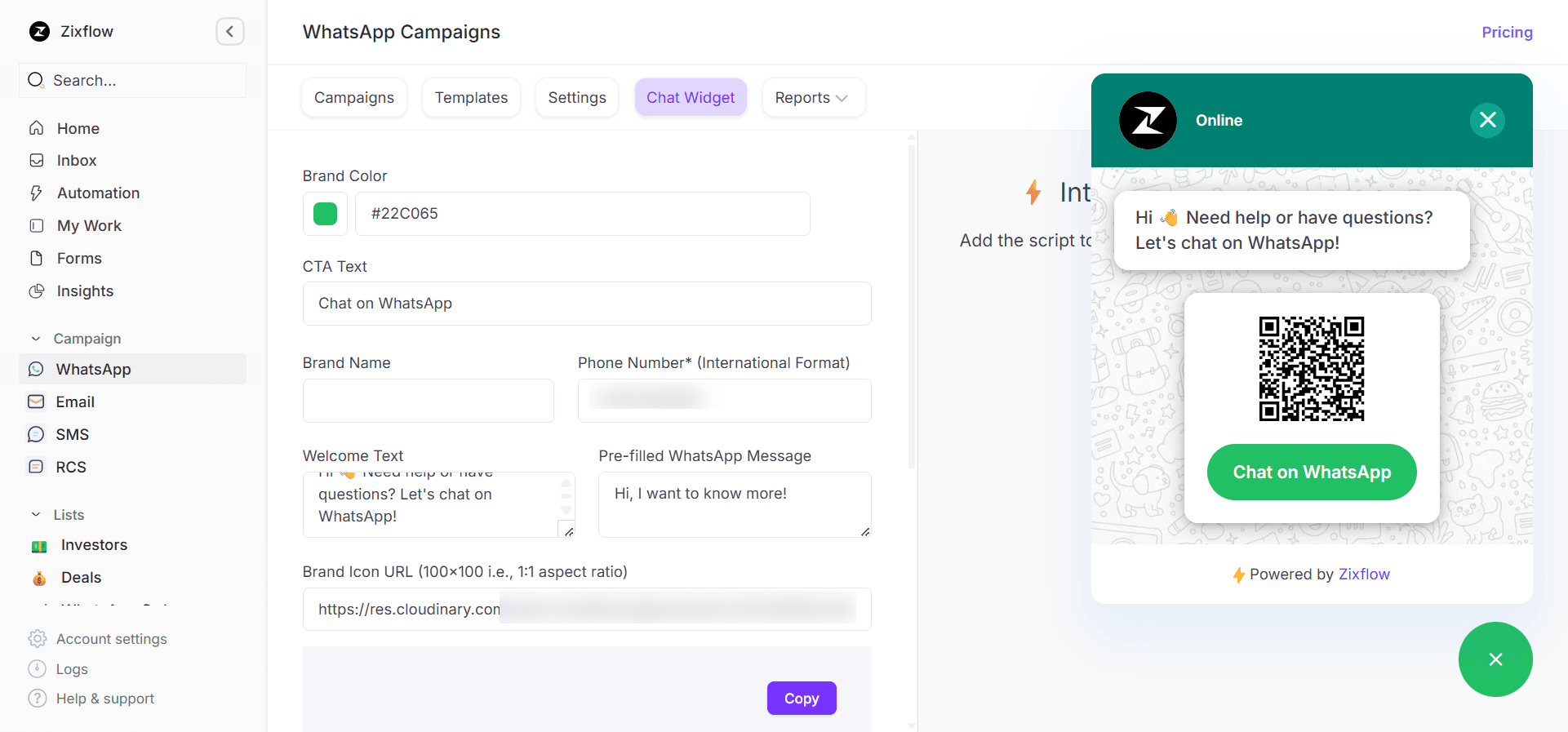
The most important configuration at this stage is the pre-chat greeting message. The greeting is what appears in the widget bubble before the visitor clicks it, for example, "Chat with us on WhatsApp."
On the other hand, the opening message is the text that gets pre-filled in WhatsApp when a visitor clicks through. A well-written opening message gives your team immediate context about the visitor's intent.
Something like "Hi, I visited your website and wanted to learn more about [your product]" gives your team a starting point rather than a blank conversation.
Copy the script to install the widget code
Once your widget is configured and saved, Zixflow generates a JavaScript embed code snippet. This is a small piece of code, usually a single script tag, that you paste into the page’s header where you want to show this widget.
If you use a tag management system like Google Tag Manager, you can deploy it there without touching your site's code directly, which is often the faster path if you do not have immediate developer access.
Once published, the widget should appear on your site within a few minutes. You do not need to rebuild or redeploy your site for the widget to become active.
WhatsApp chat widget best practices
Getting the widget live is the first step. Making it actually convert visitors into customers takes a bit more thought. These practices separate widgets that generate real conversations from those that get ignored.
Write a greeting that sets the right tone
The default greeting that most platforms provide, something like "Hey there! How can I help you?", is fine but forgettable.
A more effective greeting references what you do and makes the conversation feel warm rather than generic. "Hi, I'm here to help with any questions about our plans and pricing" is more useful than a blank invitation to chat. It signals to the visitor what they can expect from the conversation, which filters in the right people.
If your website serves different audiences, consider testing different greeting messages on different page types. For example, a visitor on your pricing page has different questions than someone reading your blog. Tailoring the greeting to the page context improves click rates and sets your team up for a more productive conversation from the first message.
Set response time expectations upfront
One of the most common reasons visitors do not click a chat widget is uncertainty about how quickly they will hear back. If someone thinks they are going to wait 12 hours for a reply, they will use the contact form instead.
Show your typical response time in the widget's status line: "Replies in under 2 hours during business hours" is specific enough to be credible and reassuring enough to encourage a click.
On top of that, make sure your team can actually back up whatever you claim. If you advertise a 2-hour response time but your team is covering 15 conversations per agent, you will consistently disappoint the expectations you set.
Align your response time claim with your actual team capacity, and use WhatsApp automation to send an immediate acknowledgment when someone initiates a conversation outside business hours.
Ready to set up your WhatsApp chat widget?
A WhatsApp chat widget is one of the more straightforward improvements you can make to your website's conversion setup, but only when it is configured properly.
The single most important thing to get right is the backend connection. A widget that links to a WhatsApp number without API support or proper routing will generate conversations that your team cannot manage at scale. Getting the API integration right from the start means every conversation that comes in through your website is tracked systematically.
Start by configuring the widget for your highest-intent pages first. Measure click rate and conversation volume over the first two weeks, and use that data to refine your greeting message and response time targets. Once the widget is working well on those pages, rolling it out site-wide becomes straightforward.
If you want to set up a WhatsApp chat widget that is connected to the API and supports your full team, you can start Zixflow's free trial and have the widget live on your site in under a day.
Frequently asked questions about a WhatsApp chat widget
What is a WhatsApp chat widget?
A WhatsApp chat widget is a floating button embedded on a website that, when clicked, opens a WhatsApp conversation between the visitor and the business. The widget typically shows a greeting message, the business name, and an agent avatar.
Clicking it takes the visitor directly to WhatsApp (on mobile or web) with a pre-filled message ready to send. Unlike traditional website chat, conversations persist in WhatsApp after the visitor leaves the site.
Do I need the WhatsApp Business API to add a chat widget?
No, you can create a basic WhatsApp chat widget using just a WhatsApp Business App number and a free link generator. However, if you need advanced WhatsApp capabilities, you need to connect the widget to the WhatsApp Business API. The API-based setup is more complex initially, but it gives you significantly more features as your conversation volume grows.
Can a WhatsApp chat widget work for multiple agents?
Yes, but only when connected through the WhatsApp Business API. When you connect your widget to the API through a platform like Zixflow, incoming conversations can be assigned to different agents and managed from a shared inbox.
Does a WhatsApp chat widget collect the visitor's phone number automatically?
Yes. When a visitor clicks your widget and initiates a conversation, their WhatsApp phone number is shared automatically as part of the WhatsApp interaction. You do not need a separate lead capture form to get their contact details.
How do I write a good greeting message for my WhatsApp chat widget?
A good greeting message for a WhatsApp chat widget should:
- Identify your business
- Set expectations about what the conversation is for
- Create a reason to click
Instead of a generic "Hi, how can I help you?", try something specific: "Hi, I can help you with pricing questions, demos, or getting started with our product."
Is a WhatsApp chat widget free to use?
Adding a basic WhatsApp chat widget using a link or a simple free tool is free. However, once you connect the widget to the WhatsApp Business API and send messages outside the 24-hour service window using message templates, Meta charges per message sent. Service conversations (replies within 24 hours of a user-initiated message) are free.