8 WhatsApp Business API Features for E-commerce to Use in 2026
WhatsApp Business API helps e-commerce brands manage customer conversations and keep shoppers informed throughout the buying journey.
 by Sahil Tyagi
The WhatsApp Business API lets e-commerce businesses run WhatsApp at scale with automation, multi-agent inboxes, and integrations. It is something the standard WhatsApp Business App can’t do. Meta retired the legacy on-premises API and moved all brands to the Cloud API. The features that matter most for e-commerce are:
- Message templates: start with five transactional ones (order confirmation, shipping dispatch, delivery confirmation, abandoned cart reminder, reorder prompt).
- Broadcast campaigns: no 256-contact cap, with two to four campaigns per month as the sustainable cadence.
- Abandoned cart recovery flows: a three-message sequence over 24–48 hours. Messages sent within 30 minutes recover 18–25% of abandoned carts.
- Automated order and shipping notifications: cover five moments from confirmation to delivery and cut “Where is my order?” tickets.
- Interactive messages: up to three reply buttons or a list of up to ten options. The in-chat product catalog allows for a better shopping experience.
- WhatsApp Payments: collect payments via UPI Intent Mode or payment gateway integration with providers like Razorpay and PayU.
- AI chatbots: manage repetitive conversations by themselves with clear handoff to human agents for complex issues.
For e-commerce businesses selling in markets where WhatsApp is the primary messaging channel, with a user base of 3 billion active users and a 98% message open rate, it’s not a statistic you can ignore anymore.
The brands already doing this are seeing WhatsApp deliver 15 to 60 times the return on ad spend across their campaigns and automated flows.
The gap between businesses using the standard WhatsApp Business App and those using the WhatsApp Business API is where most of that ROI lives. The API unlocks features that the consumer-facing app can't offer.
The WhatsApp e-commerce features available through the Business API have expanded significantly in the last two years. Meta retired the legacy on-premises API in October 2025, moving all brands to the Cloud API, which brought faster feature rollouts and more reliable uptime.
Since then, the feature set has grown to cover every stage of the e-commerce customer lifecycle. All of it is now accessible without engineering overhead through platforms that sit on top of the API.
That's why in this guide, I'll walk you through the WhatsApp Business API features that matter most for your e-commerce business. Whether you are just getting started with WhatsApp commerce or looking to extend what you are already running, this is where to focus your build.
What is the WhatsApp Business API?
The WhatsApp Business API is a programmatic interface that allows you to use WhatsApp at scale via advanced features and automated workflows.
Unlike the WhatsApp Business app, which is designed for small businesses managing conversations manually on a single device, the API is built for organizations that need automation, multi-agent team inboxes, and integration with external platforms to communicate with thousands of customers simultaneously across the full customer lifecycle.
Businesses access the WhatsApp Business API through a WhatsApp API provider, which is a Meta-approved partner that handles API access, compliance, and technical infrastructure.
For e-commerce businesses, the API is the foundation for every high-performing WhatsApp commerce workflow. Order confirmations, abandoned cart recovery, shipping updates, reorder prompts, return handling, win-back campaigns, all of these require the API's automation capabilities.
Why should you use WhatsApp Business API for your e-commerce business?
After learning about what the API is, now it's time to look at the business case for building on it. Here are some outcomes that consistently drive e-commerce adoption of the WhatsApp Business API:
Automation that runs the entire customer lifecycle
The WhatsApp Business API's automation capabilities let you build message flows triggered by customer behavior rather than the marketing calendar. A customer abandons their cart and an automated message fires 15 to 30 minutes later. None of this requires a team member to manually initiate the conversation.
This behavioral automation is what makes WhatsApp commercially scalable. Without automation, WhatsApp engagement requires your teams to manage the customer base. With automation, the workflows run continuously in the background, covering every high-stakes moment in the customer journey without manual input.
Automated WhatsApp messages also tend to reach customers closer to the moment of highest intent than scheduled email campaigns do. An abandoned cart message that fires 20 minutes after the customer leaves the checkout page arrives when the product is still fresh in their mind, which is why intent-driven flows consistently outperform broadcast campaigns on conversion rate.
Conversational commerce that shortens path to purchase
The WhatsApp Business API enables two-way conversations that can move a customer from initial interest to completed purchase without leaving the chat.
Conversational commerce in WhatsApp specifically outperforms traditional checkout flows for certain customer segments. For example, those with high intent but hesitation around a specific product question, or customers who prefer to ask before they buy.
The conversational layer also improves first-purchase conversion for customers who might not have completed a purchase on the website. A customer who can ask about sizing, get a direct answer, and complete the order in the same conversation has fewer reasons to drop off than one navigating a static product page and a multi-step checkout.
First-party data collection at scale
Every WhatsApp interaction is a first-party data event. Think about a customer who clicks a product link in a WhatsApp message or answers a post-purchase survey question via a WhatsApp flow, they are generating behavioral data that enriches their profile in your CDP. Over time, this data makes every subsequent campaign more personalized.
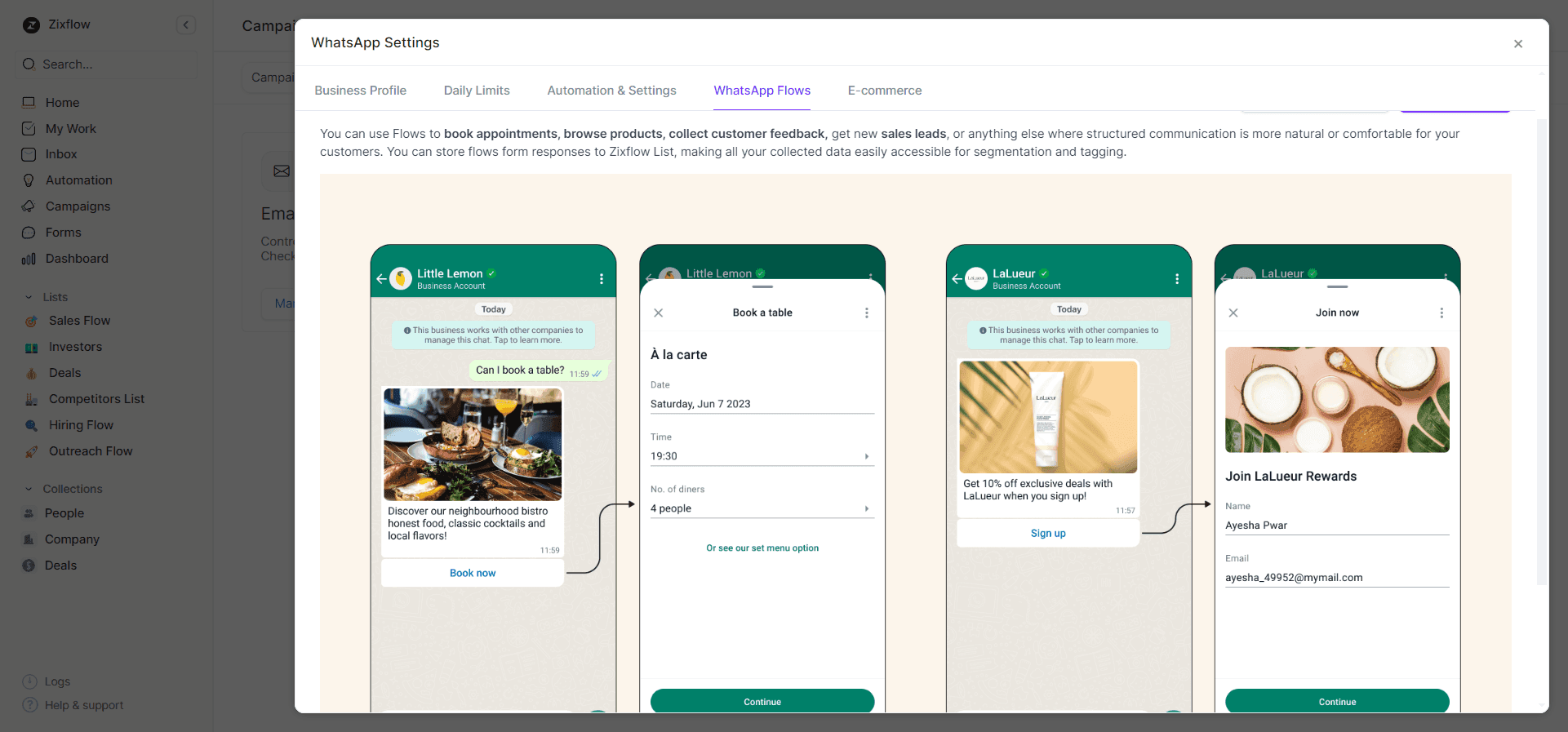
The WhatsApp Business API enables structured data collection through WhatsApp Flows. These are multi-step interactive forms that customers complete inside the chat without leaving WhatsApp. Response rates for in-chat data collection are significantly higher than for email-based equivalents because the customer is already in the conversation and the friction of completing the form is lower.
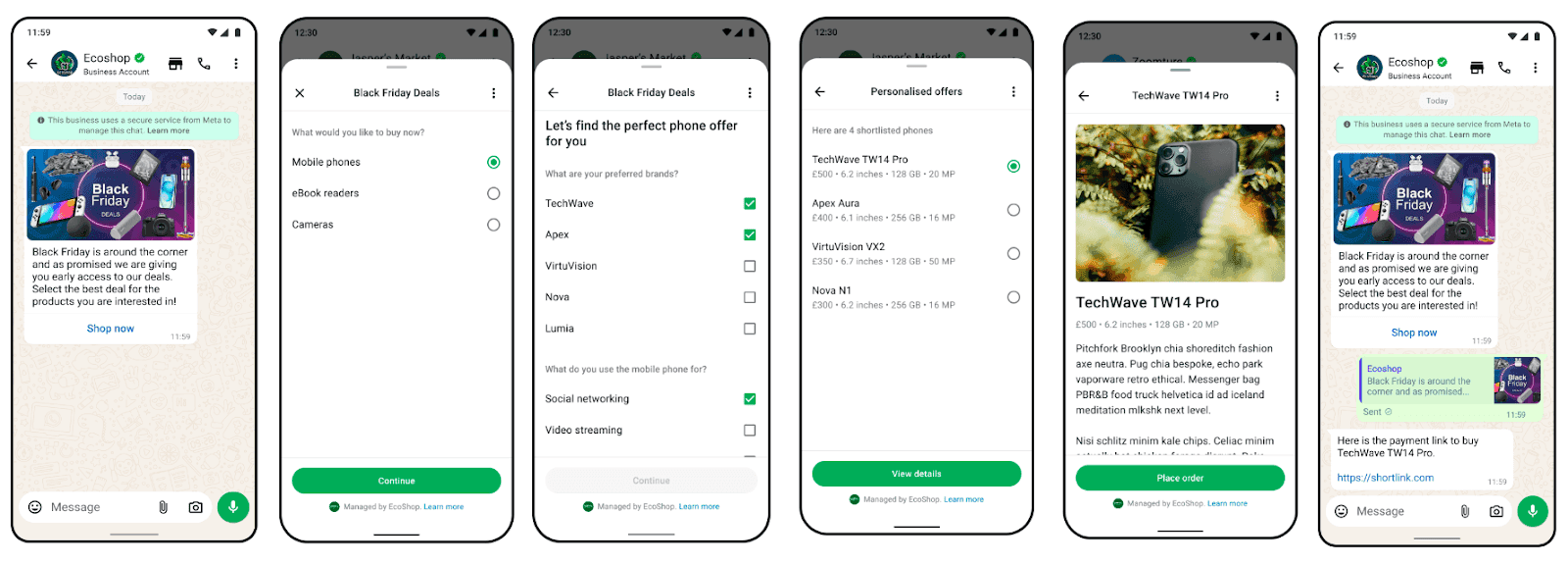
This first-party data capability is especially important as third-party cookie deprecation continues to constrain paid targeting. E-commerce businesses with rich WhatsApp behavioral data can build more accurate customer segments to run more precise campaigns than those relying on platform-supplied targeting data.
Customer support without Support at Scale Without Proportional Cost Increase
Without the WhatsApp API, WhatsApp customer support means hiring staff to respond to individual messages. With the API, AI-powered chatbots and automated flows can handle the majority of inbound support queries. Only complex queries that require human judgment escalate to a live agent.
Companies that implement WhatsApp-based customer support report up to a 30% reduction in communication costs compared to traditional support channels. The cost reduction comes from automation handling a large share of the ticket volume.
The support quality also improves because customers get responses in the channel they prefer at the time they prefer. A customer who messages at 11 PM asking about their delivery gets an automated tracking response immediately rather than the next morning. That kind of responsiveness builds the perception of excellent service without requiring 24-hour staffing.
WhatsApp Business API features for e-commerce in 2026
With that foundation in place, here are some of the crucial WhatsApp e-commerce features every brand should incorporate in their infrastructure. These range from foundational infrastructure features to advanced commerce capabilities to make the most of this channel:
Message templates for outbound notifications
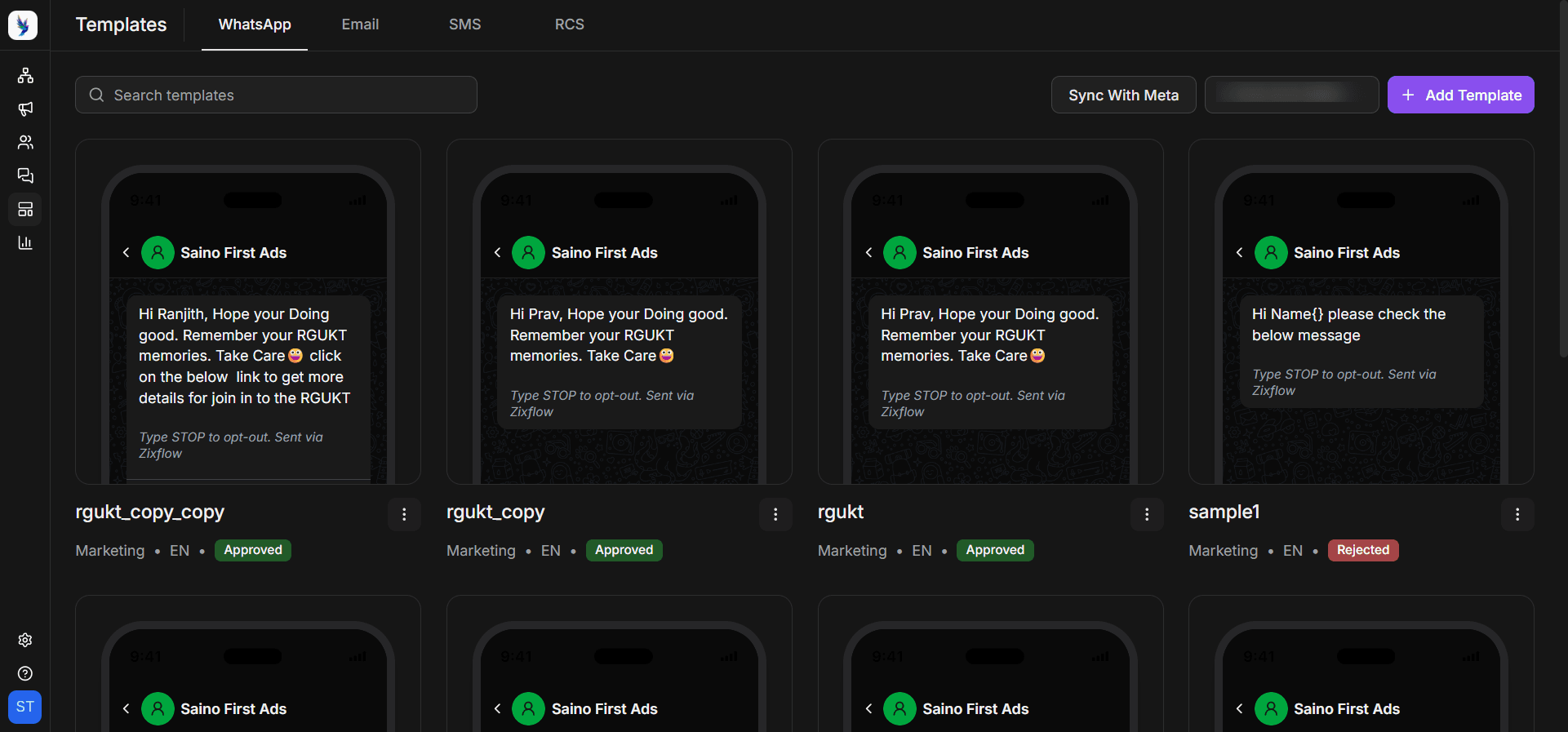
WhatsApp message templates are pre-approved messages that you can send to initiate a WhatsApp conversation with a customer outside of an active 24-hour session window. They are the foundation of every outbound WhatsApp workflow.
Templates require approval from Meta before they can be sent, which typically takes a few hours to a few days. The approval requirement exists because outbound messages are the highest-risk category for user experience. A poorly designed template can feel spammy and generate opt-outs, which damages your sending reputation and reduces your future campaign delivery rates.
The most effective e-commerce message templates combine a clear utility hook with a commercial action. For instance, a shipping update template tells the customer where their order is and also includes a reorder button for consumables.
To build your template library, start with the five highest-volume notification types in your e-commerce workflow:
- Order confirmation
- Shipping dispatch
- Delivery confirmation
- Abandoned cart reminder
- Reorder prompt
Get these approved and running on automation before adding promotional broadcast templates. The transactional templates build positive engagement history that improves deliverability for promotional sends that follow.
Broadcast campaigns for segmented promotions
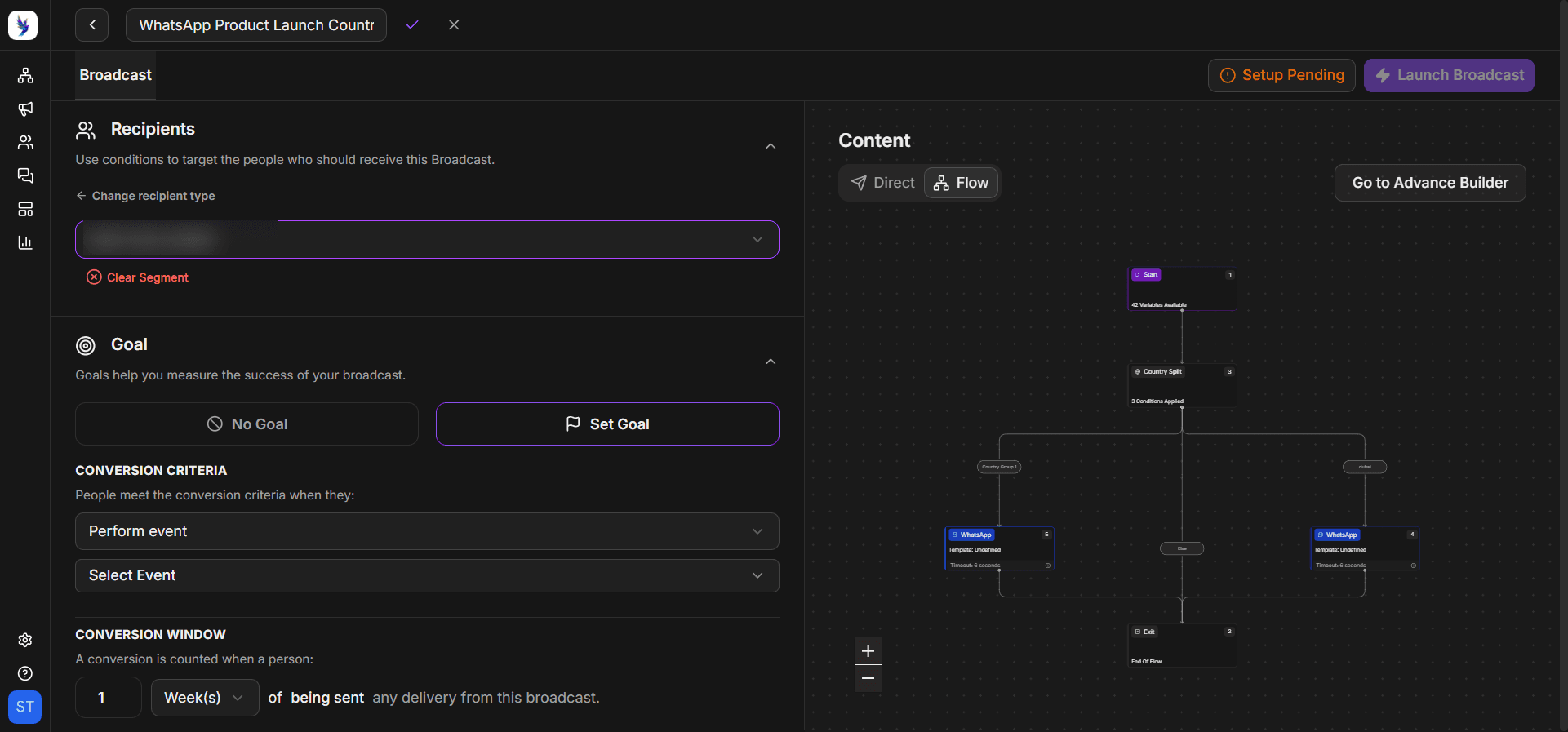
Broadcast campaigns let you send a single message template to a selected list of opted-in customers simultaneously. Unlike the WhatsApp Business app, where broadcasts are limited to 256 contacts, the API has no practical ceiling on broadcast size.
WhatsApp Broadcasts work for e-commerce promotional communication in a way that email has strugged with for years. A promotional email at a 4% open rate means 96% of your list never sees the offer. The same campaign on WhatsApp, with an open rate of 98%, still reaches the majority of the list.
The commercial case for broadcasts gets stronger when you segment properly. Sending the same message to your entire subscriber list is a missed opportunity. Segmenting your audience by purchase history, product category affinity, spend tier, or recency means each recipient gets a broadcast that's relevant to their specific relationship with your brand.
WhatsApp customer segmentation is one of the highest-leverage optimizations available to e-commerce brands running WhatsApp campaigns, because it lifts both conversion rate and opt-out quality simultaneously.
Most e-commerce businesses find that two to four broadcast campaigns per month is the sustainable cadence before opt-out rates start climbing. More than that and you risk training customers to tune out the channel. Treat every broadcast as an event worth preparing, not a weekly touchpoint to fill with whatever is on the promotional calendar.
Abandoned cart recovery flows
Abandoned cart recovery is the highest-ROI automated flow available to e-commerce businesses on WhatsApp. A customer who has added items to a cart and started a checkout has already demonstrated purchase intent. Something interrupted this decision and a well-timed WhatsApp message can remove that barrier.
What makes this mechanism work on WhatsApp is timing. An abandoned cart message arriving 15 to 30 minutes after the session ends reaches the customer while the purchase decision is still warm. Automated WhatsApp cart recovery messages convert 18 to 25% of abandoned carts when sent within 30 minutes.
A fully built cart recovery flow has three messages across a 24 to 48 hour window. The first, sent 15 to 30 minutes after abandonment, is a simple reminder that contains the customer's cart order along with an easy link back to checkout. Many customers who abandon their carts simply got distracted and will convert without an incentive.
The second message, sent 3 to 6 hours later if the customer hasn't purchased, adds a small urgency signal or addresses the most common objection for the product category.
The third message, sent the following day, includes the most compelling offer, typically a discount or a free shipping offer. The escalating sequence structure recovers more sessions than a single message as different customers respond to different triggers at different times.
To set up this flow, you'll need your e-commerce platform to pass abandoned cart events to your WhatsApp API platform, like Zixflow, via a webhook. When the trigger fires, the flow begins automatically.
Automated order & shipping messages
Order and shipping notifications are the most universally adopted WhatsApp Business API feature in e-commerce. They solve the most common source of inbound support tickets in any e-commerce operation, "Where is my order?" When customers receive proactive updates on their order status, they don't need to contact support to find out what's happening.
The standard e-commerce notification flow covers five moments:
- Order confirmation immediately after purchase
- Order processing update when the warehouse picks and packs the order
- Dispatch notification with tracking link when the carrier collects the parcel
- Out-for-delivery alert on the day of expected delivery
- Delivery confirmation once the order is marked delivered
Each message is triggered automatically by an event from the e-commerce platform or the logistics provider.
Moreover, adding a relevant product recommendation or a loyalty points update to a shipping notification captures that attention without feeling promotional. The notification provides utility and the commercial element rides along naturally.
Businesses that configure this full notification flow see measurable reductions in inbound "WISMO" (Where Is My Order) tickets, which is one of the most reliable customer engagement metrics for e-commerce support efficiency.
Interactive messages
Interactive messages add clickable elements to WhatsApp messages that make it easy for customers to respond or take action without typing. The two main interactive types available through the API are:
- Reply buttons - show up to three buttons below a message that the customer can tap
- List messages - present a menu of up to ten options the customer can select from
Interactive messages are important because they remove the friction of free-text responses from high-volume customer interactions. Instead of a customer having to type a message, they tap a button. That single design choice dramatically increases response rates on conversational flows.
For e-commerce, the most common uses of interactive buttons include post-delivery check-ins, return initiation flows, and product recommendation responses. Each of these interactions collects structured data while giving the customer a frictionless way to direct their own experience.
List messages work well for product category navigation inside a WhatsApp catalog flow. The list format handles a menu of choices more elegantly than asking the customer to type a number, and it ensures the customer selects from valid options rather than entering something the automation can't understand.
WhatsApp product catalog
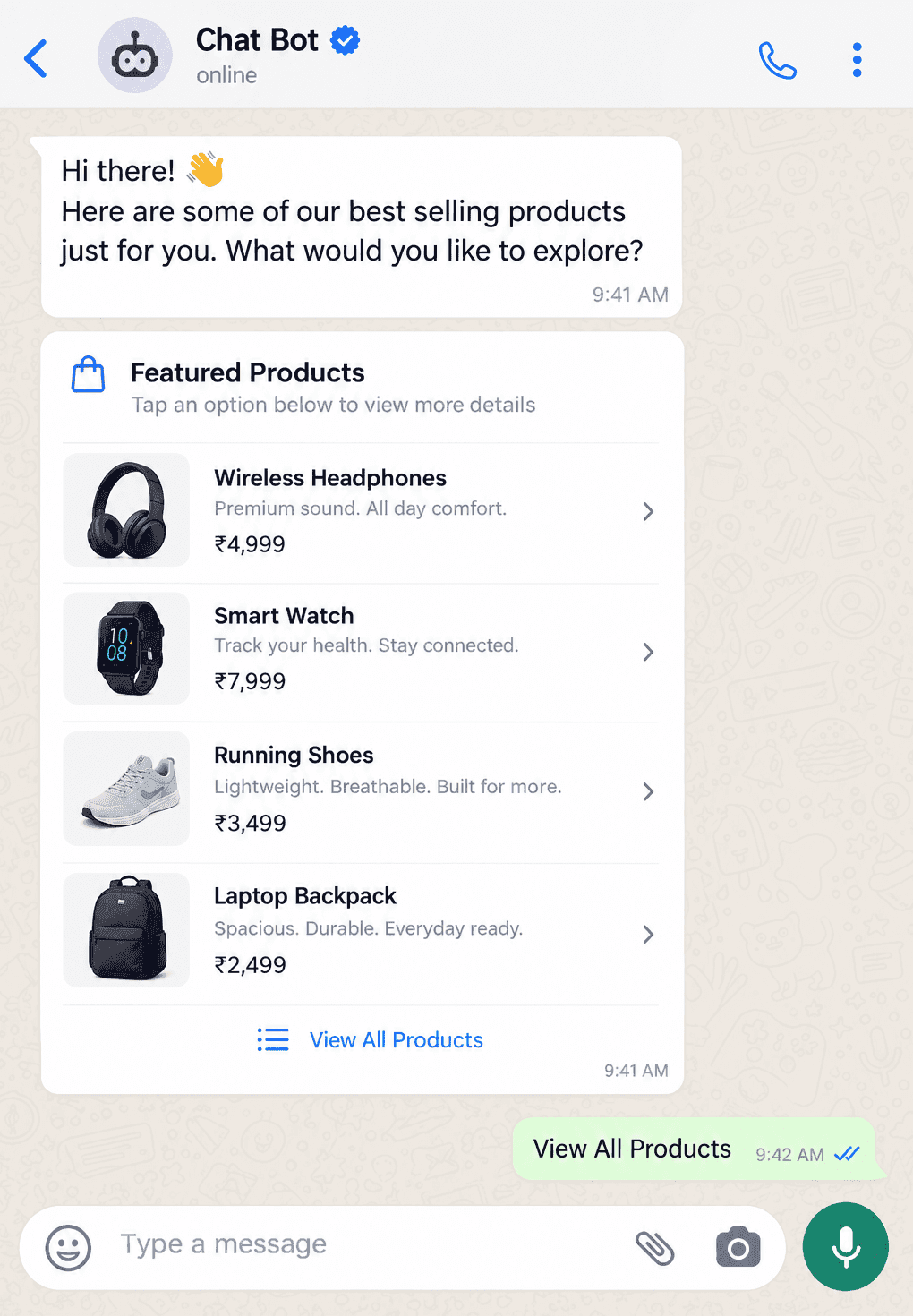
The WhatsApp product catalog feature allows you to create a browsable product storefront directly inside WhatsApp. Customers can view products, check prices and descriptions, add items, and proceed to checkout without ever leaving the WhatsApp interface. You can host up to 500 products in your catalog, with each having a name, image, description, price, and a link to the product page.
Additionally, the visual, shoppable format significantly reduces the steps between product discovery and purchase intent. Using the catalog effectively for e-commerce involves connecting your product catalog from your Meta Business Account to your WhatsApp BSP.
Most platforms that sit on top of the API support automatic catalog sync, meaning product availability and details stay updated without manual maintenance. The key decision is which products go in the WhatsApp catalog. Prioritize your top 50 to 100 bestsellers and most-frequently asked products in your inbound customer messages.
WhatsApp payments for in-chat transactions
WhatsApp Payments allows customers to complete a purchase within the WhatsApp chat without being redirected to an external payment page.
In India, where WhatsApp Pay is integrated with UPI, customers can pay directly through the chat interface using payment methods already saved on their device. Meta is expanding this capability to additional markets through partnerships with regional payment providers.
In the context of e-commerce, operating in markets with WhatsApp Payments support eliminates the highest-friction moment in the conversational commerce flow. Every redirect in an e-commerce checkout creates an opportunity for the customer to abandon. Completing payment inside WhatsApp removes that redirect and keeps the transaction within the conversational context.
The practical setup requires connecting a payment provider to your WhatsApp Business API account through a BSP that supports payment integration. In India, this can be done in two ways:
- UPI Intent Mode - You can use this method with gateways that support UPI Intent generation
- Payment Gateway Deep Integration Mode - Supports providers like Razorpay, PayU, Billdesk, and Zaakpay.
Even in markets where native WhatsApp Pay isn't available, payment links embedded in WhatsApp messages perform significantly better because the link arrives in a high-attention channel.
AI-powered chatbots
AI chatbots connected to the WhatsApp Business API handle inbound customer conversations at scale without human intervention. For e-commerce, the most common chatbot use case is handling common objections or answering frequently asked questions.
Using chatbots in WhatsApp e-commerce is primarily about response time and cost efficiency. Customers who message WhatsApp expect a faster response. An AI chatbot responds in seconds, 24 hours a day. For high-volume e-commerce operations, the chatbot is what makes WhatsApp support economically viable at scale.
Additionally, modern AI chatbots go beyond scripted decision trees. Large language model-powered chatbots can understand natural language queries and retrieve order data from your e-commerce platform via API without requiring the customer to navigate a menu structure.
One thing to note here is that when implementing these WhatsApp chatbots, they should have a clear path to a human agent for the cases they can't resolve confidently. A chatbot that handles 80% of tickets well and escalates the other 20% cleanly is a major efficiency win.
On the other hand, a chatbot that tries to handle 100% of tickets and gives unhelpful responses to the 20% damages customer trust. It also generates more work for the support team when frustrated customers call or email to complain.
Ready to build your e-commerce stack with WhatsApp Business API?
The WhatsApp Business API features span the full e-commerce lifecycle. Together they make WhatsApp a complete commerce and support channel, not just a messaging tool.
The most important thing to understand about building on these WhatsApp e-commerce features is the sequence in which they pay back. Start with the features that directly recover lost revenue and reduce support costs. Those two investments produce measurable ROI quickly enough to fund the next layer.
After that, you can focus on broadcast campaigns, product catalogs, and interactive flows. That sequence builds on itself rather than requiring a large upfront commitment before seeing any return.
However, keep in mind that not every feature is right for every e-commerce business.
If you are processing 500 orders a month, you don’t need a multi-agent inbox with complex routing logic yet. Meanwhile, if you are handling 50,000 orders a month, you most certainly do. Match the feature set to your actual conversation volume and support complexity to build the more sophisticated capabilities as your operation scales to where they are needed.
So, if you are looking for a platform that gives you access to all of these WhatsApp Business API features in a single interface, then Zixflow is worth a look.
You can book a personalized demo or start a free trial to connect your e-commerce store today.
Frequently asked questions about WhatsApp Business API features for e-commerce
What is the WhatsApp Business API and how is it different from the WhatsApp Business app?
The WhatsApp Business API is a programmatic interface that allows businesses to send and receive WhatsApp messages through tools, with automation, CRM integration, and multi-agent support.
It differs from the WhatsApp Business app in scale and capability. The app is for small businesses managing conversations manually on a single device, while the API handles unlimited simultaneous conversations.
The API requires access through Meta or a Business Solution Provider and uses approved message templates for outbound messaging.
What are the most important WhatsApp Business API features for e-commerce?
The highest-ROI WhatsApp Business API features for e-commerce are abandoned cart recovery flows, automated order and shipping notifications, broadcast campaigns with segmented audiences, interactive messages with reply buttons, the product catalog for in-chat browsing, and an AI chatbot for automated support.
How much does WhatsApp Business API cost for e-commerce?
WhatsApp Business API pricing is per-message-based. The rates for each message vary depending on the type of message and country of the recipient. To learn more ab4out WhatsApp API pricing, check out our article on WhatsApp Business pricing changes.
Can WhatsApp Business API integrate with Shopify?
Yes. WhatsApp Business API integrates with Shopify through platforms that sit on top of the API and offer native Shopify connectors, like Zixflow.
These integrations sync your product catalog, trigger abandoned cart flows from Shopify cart events, fire order and shipping notifications from Shopify fulfillment events, and allow you to send personalized messages based on Shopify customer data.
Do you need a developer to set up the WhatsApp Business API for e-commerce?
Not necessarily. Platforms like Zixflow that provide access to the WhatsApp Business API come with no-code features for setting up your e-commerce workflows without requiring technical knowledge.
Standard e-commerce integrations with Shopify, WooCommerce, and similar platforms are typically available as one-click setups through Zixflow. Also, more custom workflows, such as complex multi-step Flows or a fully custom AI chatbot with order management integration, can be built within Zixflow’s infrastructure by using the drag-and-drop functionality.