WhatsApp Lifecycle Marketing for Ecommerce Businesses
A WhatsApp lifecycle marketing strategy helps e-commerce brands stay relevant to customers at different stages of their buying journey.
 by Sahil Tyagi
Most e-commerce brands use WhatsApp for order updates or one-off discount blasts, with neither building a lasting relationship. WhatsApp lifecycle marketing changes that by sending each shopper the right message for where they are in their journey.
Here’s how WhatsApp helps in interacting with customers across every lifecycle marketing stage:
- Acquisition: Start conversations and capture opt-ins with Click-to-WhatsApp ads
- Onboarding: Use a short welcome flow to learn what each shopper wants
- First purchase: Recover abandoned carts with a timely reminder
- Delivery: Turn order updates and COD confirmations into trust-building moments
- Post-purchase: Collect feedback a few days after delivery
- Repeat purchase: Bring customers back with replenishment reminders and cross-sell offers
Messaging has quietly become the place where shoppers expect to talk to brands. 73.3% of consumers across 22 markets prefer messaging when communicating with a business. In India, WhatsApp sits right at the center of that shift.
The problem is that most e-commerce brands still use WhatsApp in one of two ways. They either send order updates or they blast discount codes to their entire list. Neither builds a relationship, and the second one usually ends with customers muting or blocking your brand.
That's where WhatsApp lifecycle marketing comes in. Instead of treating WhatsApp as a broadcast channel, you plan marketing campaigns around where each customer is in their journey.
So, in this guide, I'll walk you through what e-commerce lifecycle marketing on WhatsApp looks like and how to run it at every stage.
What is WhatsApp lifecycle marketing for e-commerce?
WhatsApp lifecycle marketing in the context of e-commerce, is the approach of sending planned WhatsApp messages to shoppers based on their stage in the customer lifecycle. The lifecycle stages within a customer journey are:
- Acquisition
- Onboarding
- First purchase
- Delivery
- Post-purchase
Each send is triggered by a customer action or a time-based rule, so shoppers get relevant WhatsApp messages instead of generic broadcasts.
In practice, this means connecting your store data to WhatsApp so that events can trigger the right message. Based on events, some of these messages can be utility messages, such as order confirmations while the others are marketing messages, such as limited-time offers. Plus, every message can turn into a two-way conversation, because customers can reply right away.
The difference from traditional lifecycle marketing on email is the channel. Email is read later and rarely answered. WhatsApp is read quickly and invites a reply. This makes your lifecycle program a series of conversations rather than a sequence of announcements.
If you want the broader framework first, our guide to customer lifecycle marketing covers it across channels.
Why WhatsApp lifecycle marketing is crucial for e-commerce brands?
When it comes to e-commerce, most of the profit sits in the repeat purchases on top of the first. WhatsApp lifecycle marketing helps you reach those orders by keeping the conversation going after checkout. Here are the main reasons it's worth the effort:
Meet shoppers where they make decisions
WhatsApp lifecycle marketing puts your brand inside the app your customers already use every day. That matters because the decision to buy often happens in a chat, and not on a landing page. When an offer arrives in the same place as messages from friends and family, it gets seen and considered.
Nearly 60% of Indian users are likely to buy a product after seeing an offer on WhatsApp, according to a GWI study commissioned by Meta. For your business, that means lifecycle offers have a far better chance of turning into orders than the same offer buried in an inbox.
Turn one-time buyers into repeat customers
Lifecycle messages are designed to bring customers back after their first purchase. A timed follow-up or a product tip gives shoppers a reason to return before they forget your brand.
For example, Nordic skincare brand Vessi re-engages customers on WhatsApp 30 days after purchase with product guidance and cross-sell offers. They credit this with strong growth in repeat revenue and a higher average order value. Repeat customers cost far less to win than new ones, so each returning order improves your profitability directly.
Lowers post-purchase communication cost
WhatsApp's pricing rewards brands that message customers in context. This is because since July 1, 2025, Meta charges per message, and utility templates delivered within an open customer service window are free, as are all non-template replies. That means order confirmations and follow-ups sent while a customer is already chatting with you cost nothing.
On the other hand, marketing templates are always charged. So a well-planned lifecycle program utilizes money where it drives revenue and saves it everywhere else.
Our breakdown of the WhatsApp Business pricing update covers the rate changes in detail.
Builds trust through two-way conversations
WhatsApp lets customers reply and ask questions in the same thread where they received your message. That two-way flow removes the friction that stops many shoppers from completing a purchase. When customers know they can reach you easily, they're more willing to stay in touch with your brand, even after the purchase.
Connects updates & marketing in one thread
On WhatsApp, you can send multiple types of messages, ranging from simple order updates to catalogs within the same WhatsApp chat. This gives customers a familiar place to find everything about their order and your brand.
When transactional messages earn trust first, your marketing messages land on a channel customers already rely on. This establishes you as a helpful aide to customers rather than a business simply wishing to see your offerings.
How to use WhatsApp lifecycle marketing at every e-commerce stage?
After learning why lifecycle marketing matters, now it's time to put it into practice. The strategies below follow the e-commerce customer lifecycle in order, so you can build one stage at a time instead of launching everything at once.
Capture opt-ins with Click-to-WhatsApp Ads
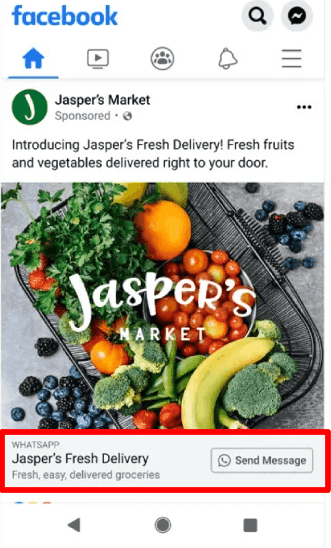
The acquisition stage is about starting a conversation with new shoppers and getting permission to message them again. Click-to-WhatsApp Ads are the most direct way to do this as customers open a WhatsApp chat with your brand straight from Facebook or Instagram.
This works because it skips the landing page and moves the shopper into a conversation where they can ask questions and get answers right away.
On top of that, it also changes your messaging costs.
When someone messages you from a Click-to-WhatsApp ad and you reply within 24 hours, Meta opens a 7-day service window instead of the previous 72-hour one free entry point window during which you can send any type of message at no charge.
The best way to make this work is to design the first reply before you launch the ad. Write an automated WhatsApp welcome message that thanks the shopper and asks one simple question about what they're looking for.
A thing to take into account here is ad conversations bring in shoppers with very different levels of intent. Some are ready to buy, while others just want a price. If you can't reply quickly during business hours with clear expectations in the automated welcome, the conversation will just go cold. A slow first reply wastes both the ad spend and the free messaging window.
Build a welcome flow that learn what shoppers wants
Onboarding is the stage between someone opting in and placing their first order. A welcome flow on WhatsApp introduces your brand and, more importantly, collects the information you'll need to personalize every message that follows.
A short welcome sets the tone for future messages and gives you first-party data, such as product type, size, or preferred categories, without forcing customers to fill out a long form. That data is what separates a relevant replenishment reminder from a generic discount.
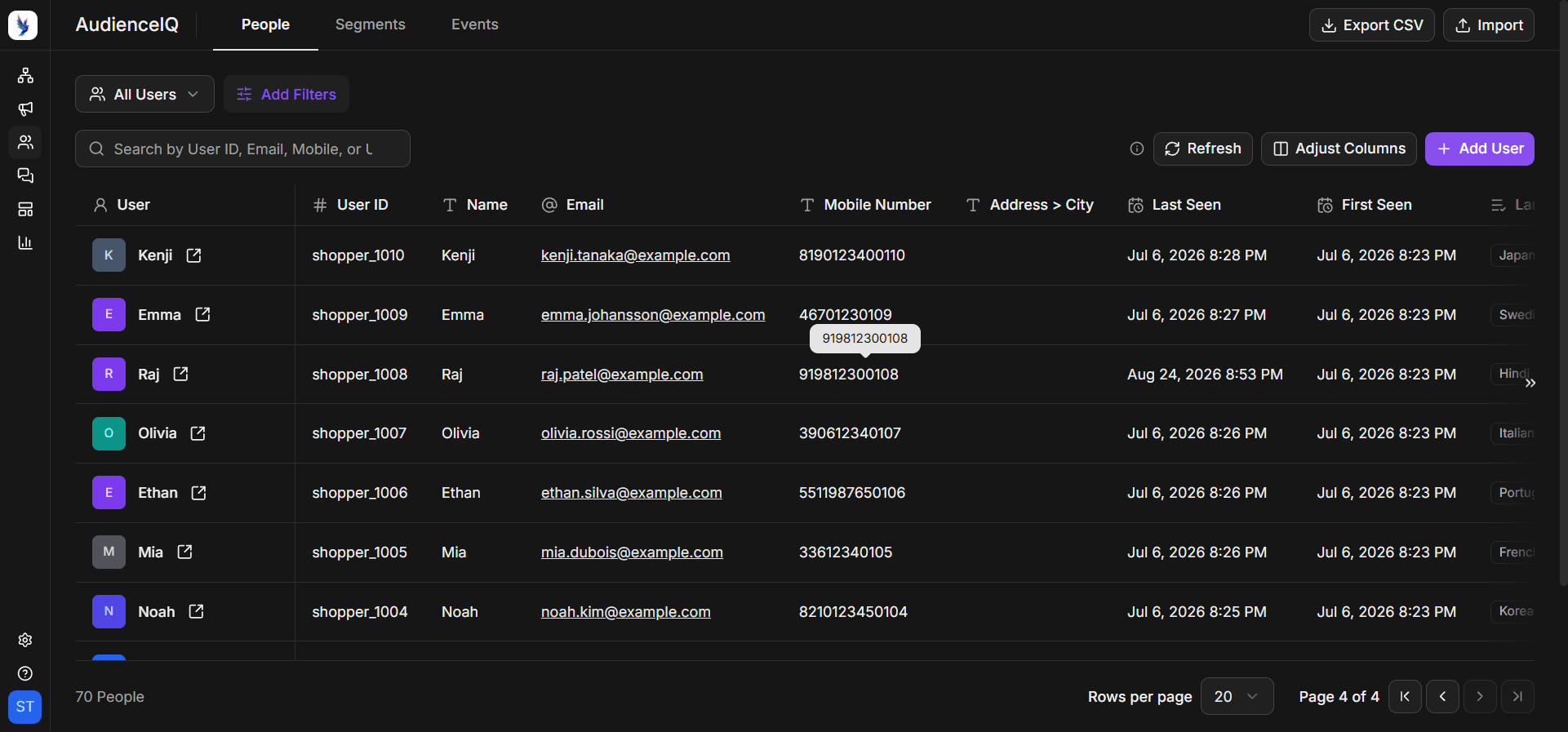
The most practical way to do this is with a short in-chat form built on WhatsApp Flows. Keep it to two or three questions to make it super easy for potential customers to provide information without losing interest. Store each answer as a contact attribute in your CDP, then use it to choose the first product recommendation you send.
Additionally, asking customers how often they want to hear from you gives them control. People who choose their own frequency are less likely to block you later, which protects your quality rating.
Be mindful to not turn onboarding into a survey. Every extra question lowers the number of people who submit the answers. If you're unsure which questions matter, start with the single attribute that changes your product recommendations the most. Only add more only once you see people completing the flow.
Recover abandoned carts
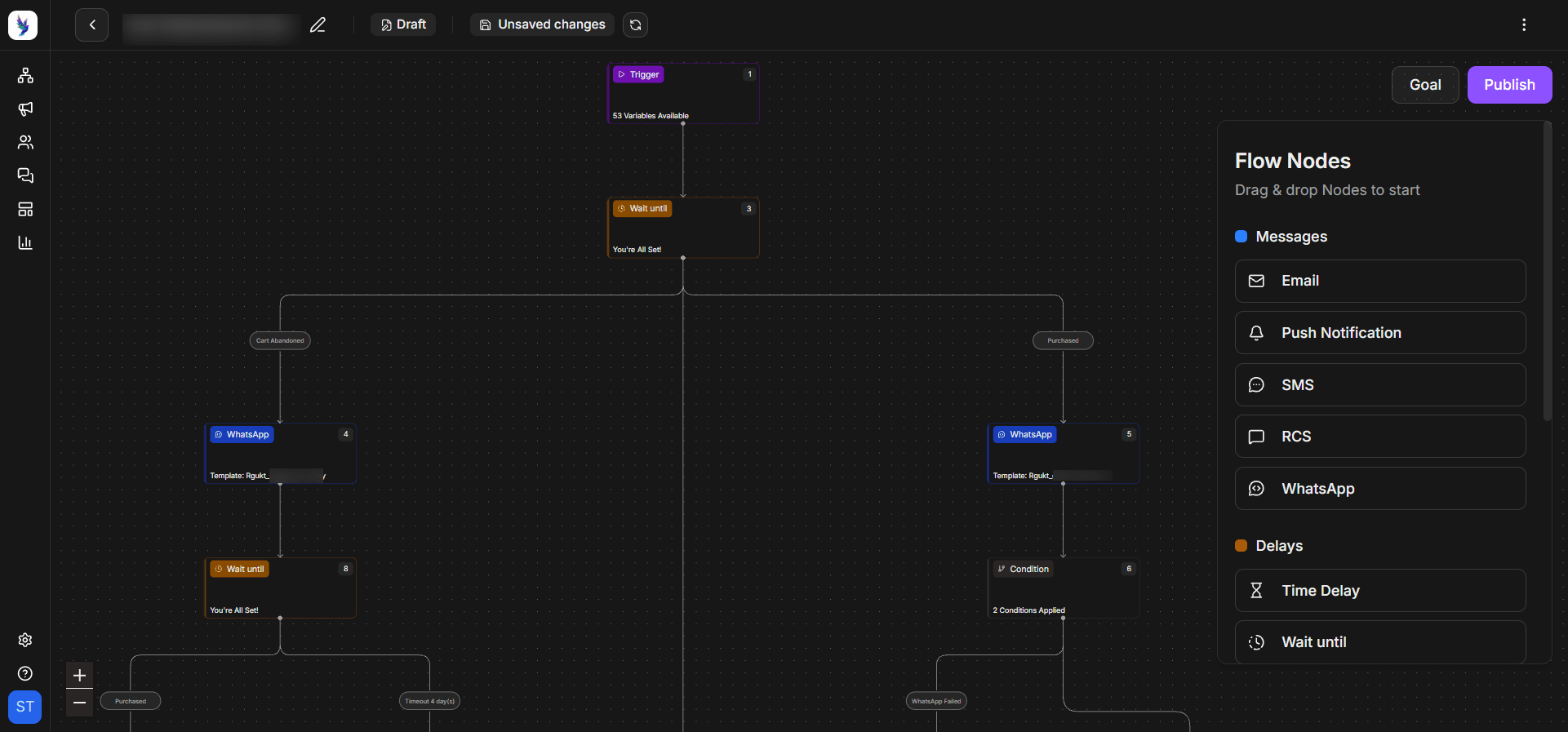
The first-purchase stage is where many shoppers drop off. Abandoned cart recovery on WhatsApp reaches people who added items or viewed products but didn't check out, while their interest is still fresh.
The reason this works is WhatsApp messages get seen quickly, and timing matters more than anything in cart recovery. For example, a reminder that arrives within an hour of abandonment catches the shopper while the product is still on their mind.
The best way to do this is to set up a workflow with a trigger for a reminder about 30 to 60 minutes after the cart is abandoned. Show the product image and name with a direct link back to the checkout page.
Hold back the discount in the first message as many shoppers simply got distracted. If there's no response after 24 hours, send one follow-up that addresses a common sales objection, and only then consider a small incentive. Cap the sequence at two messages so you don't train customers to abandon carts for discounts.
Keep in mind that cart recovery only works if you can match a cart to an opted-in WhatsApp number. Shoppers who abandon before entering their phone number can't be reached this way, so it's worth capturing the number early in checkout, with a clear opt-in.
Turn transactional updates into trust-building moments
The delivery stage covers everything from order confirmation to the moment the package arrives. Utility messages on WhatsApp keep customers informed, and for cash-on-delivery (COD) orders, can confirm intent before you ship.
Timely updates reduce the anxiety for "where is my order?" queries and give customers confidence in your brand. For COD orders, a confirmation step also cuts the cost of failed deliveries, since you can stop shipments that customers no longer want. In markets like India, where cash on delivery is still common, that single step can save a meaningful share of your logistics budget.
The best way to do this is to map every order status in your store to a WhatsApp utility template. For COD orders, add a confirmation message with "Confirm" and "Cancel" buttons right after the order is placed. Also, route any reply that isn't a button press to your support team so questions get answered quickly.
WhatsApp utility templates are free inside an open customer service window. Sending confirmations while the customer is still chatting with you keeps costs down. Plus, if a WhatsApp message can't be delivered, an SMS fallback makes sure the update still reaches the customer.
Collect customer feedback after delivery
The post-purchase stage starts when the order arrives. Asking for feedback on WhatsApp captures customer sentiment while the experience is fresh and gives you social proof for future shoppers.
A customer can rate a product with a single tap without opening an email or visiting a review site. It also gives you an early warning when something goes wrong, so you can fix the issue before it turns into a refund request. Over time, these ratings also show you which products or delivery partners cause the most complaints.
Sending a short feedback message two to three days after delivery when the customer has had a chance to use the product is the best time to get customer feedback. Start with one tap-to-rate question using buttons. If the rating is high, follow up with a link to leave a public review. If it's low, route the conversation to your support team with the order details attached, and reply within a few hours.
Save every rating as a contact attribute so your repeat-purchase journeys can skip unhappy customers until their issue is resolved. This kind of customer feedback loop keeps you informed about what your customres want.
Drive repeat purchases with cross-sell journeys
The repeat-purchase stage is where lifecycle marketing pays for itself. Replenishment reminders and cross-sell messages bring customers back at the moment they're most likely to need something again.
This approach is great for products customers use every day. A reminder that arrives just before a customer runs out of a product feels helpful. Cross-sell recommendations based on what someone already bought feel relevant in a way that a site-wide sale never does.
Trigger a reminder a few days before the replenishment window for each item you offer. This message should come with a one-tap reorder link to the same product. For cross-sells, pick one complementary product based on the first purchase and explain why it pairs well.
Setting this reorder trigger for every product takes effort, especially if you sell hundreds of SKUs. If that's the case, start with your top ten repeat-purchase products, which usually drive most reorders. You can refine the timing once you have a few months of reorder data.
Is your e-commerce brand ready for WhatsApp lifecycle marketing?
Before you build WhatsApp journeys, it helps to be honest about whether your business has the need and resources to make them work. WhatsApp rewards brands that send relevant messages, and it penalizes those that don't. Here's how to judge where you stand:
Signs you are ready
You are likely ready if you already have a steady flow of orders and a meaningful share of repeat buyers you could scale. Brands with products that are bought again regularly, such as beauty, personal care, food, wellness, and pet supplies, tend to see the fastest returns because replenishment journeys have a natural timing.
In addition to that, you should be able to connect your store platform to WhatsApp so events like cart abandonment and order dispatch can trigger messages. If your customers already message you on WhatsApp with questions, that's a strong signal that the channel fits your audience.
Signs you may not need it yet
If you're still finding product-market fit or getting a handful of orders a week, a full lifecycle program will be more effort than it's worth. You won't have enough data to segment customers. And the cost of building journeys will outweigh the revenue they can recover.
The same goes for brands without a way to collect WhatsApp opt-in. Meta requires businesses to get opt-in before sending proactive messages, and the opt-in must clearly name your business and state that customers will receive messages on WhatsApp. Without a compliant opt-in flow, lifecycle marketing can't start.
When simpler options are enough
For early-stage brands, the WhatsApp Business App with a few saved replies and a catalog can cover customer questions without any automation. Similarly, if your products are one-time purchases with long buying cycles, such as furniture or large appliances, a few well-timed utility messages may be all you need.
Common mistake to avoid during the e-commerce WhatsApp lifecycle programs
When it comes to WhatsApp, the same features that make it effective also make mistakes expensive. A few common missteps can lower your quality rating and push customers to block you. Here's what to watch for:
Sending too many marketing messages
The fastest way to damage a WhatsApp account is to treat it like an email list. Customers who receive several promotions a week start blocking and reporting your number. Meta rate limits businesses whose quality stays low for a sustained period.
So, set a weekly cap on marketing messages per customer, and let lifecycle triggers decide most of what you send.
Asking for one broad opt-in
A single checkbox that covers every type of message makes it hard to respect customer preferences. Meta recommends getting opt-in by message category so customers know what to expect. Separate opt-ins also let customers turn off offers without losing order updates, which keeps your most important messages flowing.
Ignoring the cost of each message
Per-message pricing means every marketing template has a cost that varies by country. Brands that send the same offer to their entire list often find the spend outweighs the revenue. Track revenue per marketing message for each journey, and pause any journey that consistently costs more than it earns.
Take a look at our WhatsApp marketing costs guide to help you build that model.
Running WhatsApp in insolation from other channels
WhatsApp works best as part of a wider program, not as a replacement for email or SMS. Email is still better for long-form content and SMS reaches customers who haven't opted in to WhatsApp.
Plan which channel handles which message to make sure customers don't receive the same offer on three channels within an hour.
How to measure WhatsApp lifecycle marketing performance?
Measuring a lifecycle program is different from measuring a single marketing campaign. Each stage has its own goal, so it needs its own primary metric. Tracking the wrong number can make a working program look like it's failing.
Here's a simple way to match each stage to the metric that matters most:
| Lifecycle stage | Primary metric | What to watch for |
|---|---|---|
| Acquisition | Opt-in rate from ad conversations | Cost per opted-in contact |
| Onboarding | Welcome flow completion rate | First-order rate within 14 days |
| First purchase | Cart recovery rate | Discount cost per recovered order |
| Delivery | Confirmed COD orders | Failed delivery rate |
| Post-purchase | Feedback response rate | Share of low ratings resolved |
| Repeat purchase | Reorder rate per product | Revenue per marketing message |
Review these numbers monthly, and compare each journey against a small holdout group that doesn't receive the messages. That's the only reliable way to know whether WhatsApp is driving the result or just taking credit for orders that would have happened anyway.
Making WhatsApp lifecycle marketing for e-commerce business
Most e-commerce brands use WhatsApp for order updates or occasional broadcasts, which leaves most of its value untouched. In this guide, I’ve walked you through how to plan messages around each stage of the customer journey.
If there's one thing to take away, it's that relevance beats volume on WhatsApp. A small number of well-timed messages will drive more repeat purchases and protect your account far better than frequent promotions to your whole list.
The easiest way to get started with WhatsApp lifecycle marketing for e-commerce is to pick the one stage where you're losing the most customers today. For most brands, that's cart abandonment or the gap after the first order. Build that journey first and only after measuring the results, add the next stage to it.
When you're ready to connect your store data to WhatsApp journeys, Zixflow can help you run each stage from one place, with fallback to other channels when a WhatsApp message doesn't get through.
Start a free trial and build your first journey without a credit card.
Frequently asked questions about WhatsApp lifecycle marketing for e-commerce
What is WhatsApp lifecycle marketing for e-commerce?
WhatsApp lifecycle marketing for e-commerce is the practice of sending WhatsApp messages based on where a shopper is in their journey. This includes acquisition, onboarding, first purchase, delivery, post-purchase, and repeat purchase. Messages are triggered by actions like an abandoned cart so customers get timely updates and relevant offers that match their interest.
How much does WhatsApp lifecycle marketing cost?
Since July 1, 2025, Meta charges per template message, with rates that vary by country and message category. Marketing templates are always charged. However, utility templates are free when sent inside the customer service window and all replies within that window are free.
Do I need a customer opt-in to send WhatsApp marketing messages?
Yes. Meta requires businesses to get opt-in before sending proactive messages outside the customer service window. The opt-in must clearly state that the customer will receive messages on WhatsApp and name your business.
You can collect it on your website, at checkout, in a WhatsApp chat, or through other channels. Meta recommends separate opt-ins for different message types, such as order updates and offers.
Which e-commerce lifecycle stage should I automate first on WhatsApp?
Start with the stage where you lose the most customers or revenue. That's the abandoned cart recovery for many e-commerce businesses because they are tied to clear triggers and immediate revenue. Once this works, add post-purchase feedback and reorder journeys. Building one stage at a time lets you measure results to fix problems before you scale.
How often should e-commerce brands send WhatsApp marketing messages?
There's no single rule but most brands do well with no more than one or two marketing messages per customer per week. Lifecycle triggers should drive most of what you send. Meta already limits how many marketing messages a person receives, known as frequency capping. If you continue sending more marketing messages, it can lead to lower quality ratings.
Can WhatsApp lifecycle marketing replace email for e-commerce?
Not entirely. WhatsApp is better for time-sensitive messages. Email is still better for long-form content, newsletters, and customers who haven't opted in to WhatsApp. E-commerce brands that utilize both of them get the best results.