WhatsApp Live Chat vs. Traditional Chat Support: Which Is Better?
WhatsApp live chat and traditional chat support offer different customer experiences, making each suitable for specific business needs.
 by Sahil Tyagi
WhatsApp live chat is a customer support channel where conversations persist in the customer's app indefinitely. Customers can message at any time without needing to be on your website.
Traditional chat support is a website-embedded widget where sessions end when the browser tab closes, and follow-up emails reach only ~20% of customers.
The core structural difference is message persistence. WhatsApp threads survive after the interaction ends, making follow-up surveys, escalations, and multi-agent handoffs fundamentally more reliable.
WhatsApp live chat is the stronger primary channel for returning customers and markets where WhatsApp dominates (India, Southeast Asia, Latin America). Traditional chat still has the advantage for anonymous web visitors and enterprise B2B scenarios requiring formal ticketing.
More than 3 billion people now use WhatsApp every month. That scale has turned WhatsApp into something more than a messaging app. It's become the primary channel through which customers in dozens of markets expect to interact with the brands they buy from.
For support managers and CX leaders, that shift is creating real pressure to reconsider where they show up.
Traditional website chat was built to solve a real problem: customers needed a faster way to get answers than email.
It worked.
But customer habits have since moved on. More people expect support to happen in apps they already use, without navigating to a website first. That's why the conversation has shifted from 'do we offer live chat?' to 'is website chat still the right channel for us?'
To answer that question, in this guide, I'll walk you through how to compare WhatsApp live chat with traditional support channels for customer support across various aspects. By the end, you'll know which channel fits your support operation and when it makes sense to run both.
What is WhatsApp live chat?
WhatsApp live chat is a customer support channel built using the WhatsApp Business API. Businesses use it to handle inbound queries and manage ongoing support conversations through a verified business number in an app that customers already open every day.
Unlike a website chat widget that requires a visitor to be on your site, a WhatsApp conversation can start from a WhatsApp chat widget, a QR code, or a direct message from the customer's contact list.
Traditional chat support is the embedded widget that appears on most business websites. An agent picks up the conversation in real time through a support platform.
But the catch is, when the browser tab closes, the session ends. The conversation history disappears from the customer's side. There's no continuation available if they have a follow-up the next day.
The defining difference between these two channels is message persistence. WhatsApp threads stay in the customer's app for as long as they want. That structural difference shapes everything downstream, such as how your team handles escalations, how customers experience follow-ups, and how reliably you can measure satisfaction after a ticket is closed.
WhatsApp live chat vs. traditional chat support: How do they compare?
Now that you have a clear picture of both channels, let's look at how they actually perform across the factors that matter most for support operations.
Message visibility after the conversation ends
As I said earlier, when a traditional chat session closes, your ability to follow up through the same channel closes with it. This means that post-interaction surveys or resolution confirmations all have to go out by email. Email follow-ups typically reach open rates of around 20%, which means most customers never see them.
WhatsApp messages are opened at rates far above that. Industry benchmarks consistently place WhatsApp message open rates well above 95%. Post-interaction outreach sent via WhatsApp, whether a satisfaction survey or a ticket confirmation, actually reaches the customer.
This visibility gap directly affects how accurately you can measure support quality. CSAT data collected through email reflects only the fraction of customers who happened to open the survey. WhatsApp gives you a far more representative sample of how your support actually performed.
Response speed
Traditional live chat is synchronous. The customer has to be on the page, the agent has to be online, and both have to engage within the same window, or the conversation drops. Forrester Research found that 53% of customers are likely to abandon an online purchase if they can't find a quick answer. That same impatience applies to chat support.
WhatsApp operates asynchronously. A customer can send a message at 10 AM and pick up the response the next morning without losing any context. The full thread stays intact, and any attachments are visible to both sides. For your team, this removes the instant-or-nothing pressure that traditional live chat creates with every new conversation.
Multi-agent collaboration
Most traditional chat platforms route incoming conversations by department or availability. When an escalation happens, the incoming agent typically sees only the current session, not the history.
The customer has to repeat themselves. That friction adds time to resolution and frustration to the experience.
WhatsApp, connected through a WhatsApp multi-agent inbox, gives every agent access to the complete conversation history regardless of who handled it previously.
Internal notes can be added without the customer seeing them. Plus, the routing can also be configured automatically based on message content or agent availability.
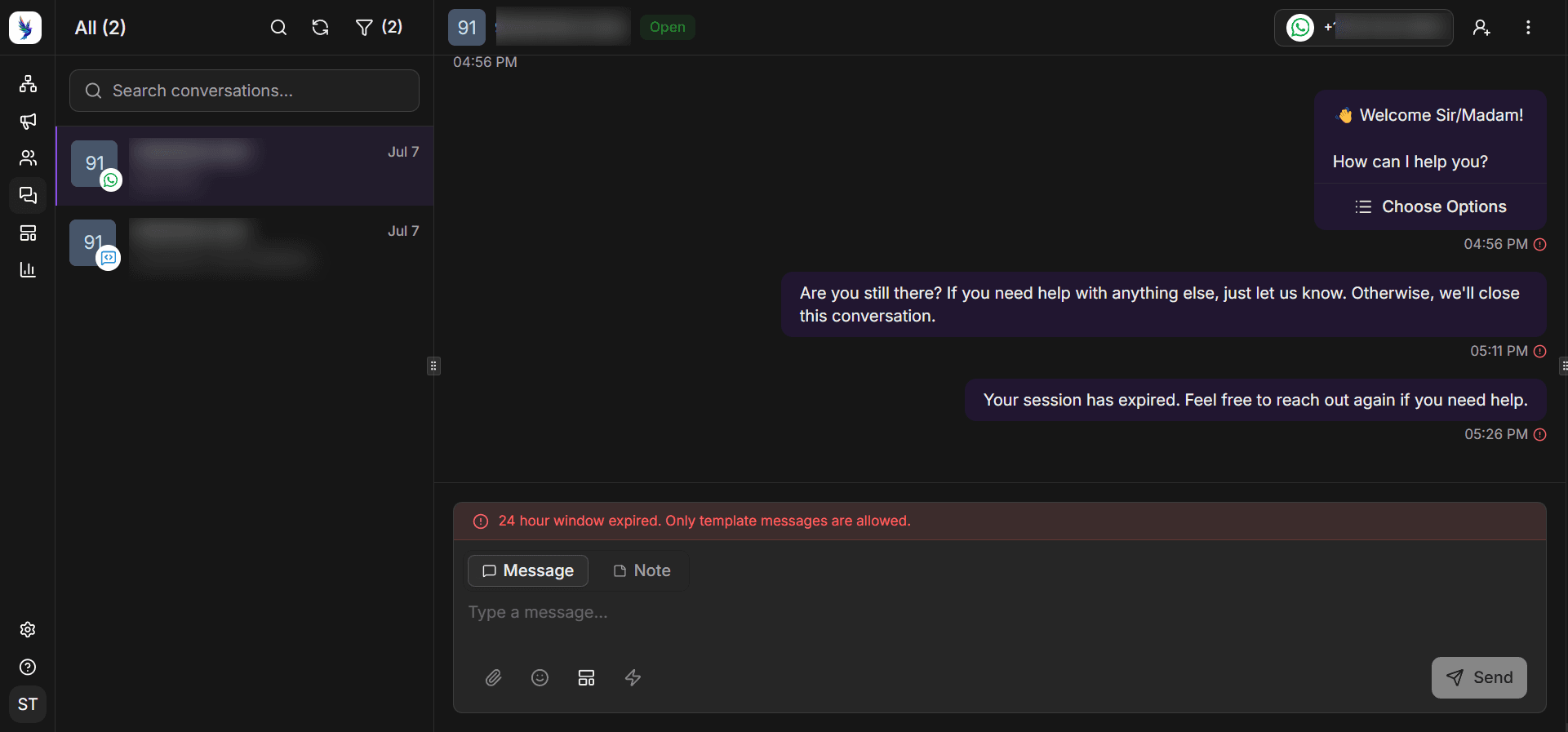
For support teams managing high daily volume, that continuity across agents is a meaningful operational advantage. Escalations stop being disruptive to the customer, which shows up directly in satisfaction scores.
CRM integration
Traditional live chat tools often operate in a silo. Customer data from a session may or may not sync into your CRM depending on the integration. When it doesn't, agents log conversations manually, and follow-up outreach relies on records that aren't complete.
WhatsApp, connected through a WhatsApp CRM integration, routes conversation history, contact details, and agent notes into a single customer record. Every interaction enriches that profile. An agent responding to a new ticket can see past conversations and open issues before typing a single word.
For D2C businesses where customers return repeatedly over months, that complete record is crucial. Support that already knows the customer's history feels fundamentally different from support that asks them to start from scratch.
Cost and scalability
Traditional live chat costs scale with headcount. More conversations require more agents and increasing platform seats. Adding automation means layering a separate tool on top of the existing chat platform.
WhatsApp Business API pricing is message-based rather than seat-based. Automation runs natively within the same thread. A triage flow qualifies the issue, and an agent steps in only when needed. For teams looking to grow support capacity without proportionally increasing headcount, that model changes the economics considerably.
That said, WhatsApp isn't a free channel at scale. Businesses that initiate conversations pay per message based on message category, and those costs can accumulate in high-volume scenarios. Having clarity on your WhatsApp support use cases before you scale is worth the planning time.
Why are more support teams choosing WhatsApp over traditional chat support?
Having said that, comparing features only tells part of the story. Let's look at why the migration to WhatsApp as a primary support channel is accelerating across businesses of different sizes.
Customers don’t need to go anywhere
Sending a customer to your website to find a chat widget and wait for an agent adds friction. WhatsApp removes that step entirely. Customers already have the app. They can reach out during a commute, between meetings, or late at night, without navigating to a page.
That reduced friction shows up in contact rates. Brands that add WhatsApp as a support option typically see queries shift away from phone and email without any additional marketing effort. Customers choose it because it fits naturally into how they already communicate.
This is especially true in markets like India, Southeast Asia, and Latin America, where WhatsApp is the dominant communication platform. If your customer base is in those regions, the channel difference becomes even more pronounced.
Asynchronous support improves efficiency
Traditional live chat creates pressure that's hard to sustain across a shift. Support reps are expected to respond in seconds and maintain high satisfaction scores throughout. That sustained urgency affects both the quality of responses and how long good agents stay in the role.
WhatsApp's asynchronous nature changes the pace. A two-minute response doesn't trigger abandonment. Reps can read the full thread and think through an accurate answer rather than typing under a countdown timer. Teams report better response quality and lower burnout in this kind of support environment.
Customer support roles have some of the highest turnover rates of any function. Reducing the sustained pressure of the job has real effects on how long experienced agents stay, and on the consistency of the support experience customers receive.
Rich media shortens resolution time
Traditional live chat is primarily text-based. File attachment support varies in reliability across platforms.
On the other hand, WhatsApp natively supports images, documents, voice notes, and short video clips within the same conversation thread. When a customer shares a screenshot of an error, or a rep sends a short walkthrough clip, it happens without switching channels.
Fewer back-and-forth messages mean faster resolution. For teams running WhatsApp after-sales support, that media richness makes the post-purchase experience noticeably smoother for customers.
Automation that doesn’t interrupt customer experience
One persistent criticism of chatbot-first live chat is how recognizable the automation is. Customers identify scripted responses quickly. When the bot can't resolve the problem, they feel trapped before a human ever appears.
WhatsApp automation, when configured well, runs the initial qualification in the same thread that the agent will continue. The customer provides their order number or describes their issue, and the agent picks up with full context already in view.
The shift from automation to human feels continuous rather than jarring. That continuity is one reason WhatsApp automation in support settings tends to produce stronger customer satisfaction than traditional bot-first chat flows.
When does traditional chat support still have the advantage?
WhatsApp isn't the right first choice for every support scenario. The honest answer here means naming where traditional chat tools still come out ahead:
Anonymous web visitor conversations
WhatsApp requires a phone number and an active account. For an anonymous web visitor browsing your pricing page with a quick pre-signup question, a website widget is still the lower-friction option. They don't need to open a separate app or share a number to get an answer.
Proactive chat triggers are also more naturally suited to traditional live chat. Widgets that appear based on time-on-page or scroll depth are straightforward to configure on most platforms.
However, WhatsApp does support a chat widget, which can be embedded on your site. Whenever a visitor clicks this widget, the WhatsApp app on their phone opens, and a pre-written message can be sent with a tap. This way, they don’t have to explicitly send their contact information before they can interact with you over WhatsApp.
Enterprise support with structured ticketing requirements
For enterprise B2B support where conversations involve multiple stakeholders, formal documentation, and strict SLA tracking, a dedicated helpdesk with structured ticketing still offers advantages that WhatsApp threads can't cleanly replicate. Formal audit trail requirements are better handled by purpose-built tools.
Many enterprise teams address this by using WhatsApp as the customer-facing communication layer and managing resolution workflows in a backend helpdesk.
For instance, a customer communicates through WhatsApp, and the team tracks the ticket internally. That combination captures the channel benefits without giving up the operational structure.
How to choose the right support channel for your business?
If your customer base already messages you on WhatsApp, or if your support volume comes from returning customers with a conversation history worth preserving, WhatsApp live chat is the stronger primary channel.
It's also the right choice when you want support and proactive notifications to run through the same thread, or when you're serving markets where WhatsApp is the dominant platform.
Traditional live chat still earns its place when support volume comes primarily from anonymous web traffic, when queries are simple enough to resolve through a quick widget without escalation. It's also a practical starting point if your team is small and the setup overhead of WhatsApp isn't yet justified by your volume.
Most mid-market businesses don't need to choose exclusively. The approach that covers the most ground is using WhatsApp as the primary channel for returning customers and keeping a traditional widget for anonymous first-time web visitors.
For a broader view of how these channels fit together strategically, it's worth reviewing how different customer engagement channels can work across the full customer lifecycle.
The decision that tends to create the most downstream friction is treating the channel switch as low-stakes. Customers form habits around how they reach you. Switching channels after those habits are set creates confusion on both sides. So, make the decision with your volume, customer profile, and team capacity in mind.
WhatsApp live chat vs. traditional chat: Which channel fits your customers?
The comparison between WhatsApp live chat vs. traditional chat support comes down to where your customers prefer to communicate and what your support team needs to perform well.
WhatsApp delivers stronger message visibility, persistent conversation history, native automation, and more reliable post-interaction measurement. Traditional live chat holds its ground for anonymous web visitors and structured enterprise ticketing scenarios.
The channel matters, but the workflow behind it matters more. A well-built support process on traditional chat will consistently outperform a poorly configured WhatsApp setup. Channel selection is the first decision. After that, routing logic, CRM integration, and agent training are what determine how it actually performs in practice.
Having said that, if you want to see how WhatsApp live chat works in practice for your team, start a free trial with Zixflow and explore how its WhatsApp messaging capabilities allow you to deliver top-notch customer support effectively.