WhatsApp Multi-Agents: A Guide for Quicker Interactions [2026]
Set up WhatsApp multi-agent support by assigning conversations to multiple team members, reducing response times, and improving customer service.
 by Sahil Tyagi
![WhatsApp Multi-Agents: A Guide for Quicker Interactions [2026]](https://webimages.zixflow.com/Featured_Image_SS_BP_0616_Whats_App_Multi_Agents_A_Guide_for_Quicker_Interactions_2026_7b20147e15.png)
A WhatsApp multi-agent setup allows multiple team members to access, manage, and respond to customer conversations from a single WhatsApp Business number simultaneously.
It works through the WhatsApp Business API, which removes the single-device restriction of the standard Business App, thereby giving each agent their own login within a shared inbox.
The standard WhatsApp Business app supports up to five linked devices but has no assignment, no routing, and no performance tracking. A proper multi-agent platform built on the API removes these limits entirely and scales to hundreds of agents on a single number.
WhatsApp has more than 3 billion monthly active users globally, making it the most downloaded mobile messenger app in the world. Over 200 million businesses use it every month, and more than 175 million people send messages to a WhatsApp Business account every single day, according to Meta.
Being such a massive platform, if you’re thinking of adopting it for your business, you might be wondering where the problem is.
The issue is that the standard WhatsApp Business app was designed for one person. One phone, one agent, one conversation at a time. For a solo founder handling a handful of inquiries a day, that works fine. For a support team of eight people managing hundreds of conversations, it turns into a bottleneck fast.
That's why growing teams start searching for a WhatsApp multi-agent setup. So, in this guide, I'll walk you through what WhatsApp multi-agent is, how it works, the benefits it brings to teams, and what to look for before you choose a platform.
What is WhatsApp multi-agent?
A WhatsApp multi-agent setup allows multiple team members to access, manage, and reply to conversations from a single WhatsApp Business number at the same time. Instead of one person owning the entire inbox, conversations are shared and assigned across your whole team, whether that's two agents or 20.
This is made possible through the WhatsApp Business API, which removes the single-device restriction of the standard WhatsApp Business app. Through a third-party WhatsApp API provider connected to the API, teams get a shared inbox where conversations can be routed to specific agents and easily monitored from one place.
It's worth being clear about what a multi-agent setup is not. It's not multiple people sharing one WhatsApp login or phone. That approach breaks down fast because it creates message conflicts and violates WhatsApp's terms of service.
A proper multi-agent setup uses the WhatsApp Business API through an official Business Solution Provider and gives each agent their own login within a unified platform.
WhatsApp multi-agent vs. the WhatsApp Business app
The WhatsApp Business app is a free tool built for small businesses. It lets a solopreneur manage a business profile, set up quick replies, and respond to customers from up to five linked devices.
But those devices all see the same inbox, with no way to assign a conversation to a specific person. There is also no way to track who responded and no way to measure team performance.
A WhatsApp multi-agent platform solves all of this.
Every conversation is visible to the whole team, but ownership is clear because conversations are assigned to individual agents. Managers can monitor response times, see open and resolved conversations, and diagnose where the team is getting stuck.
Think of it as the difference between sharing one email address with no organization, versus running a proper helpdesk.
| Feature | WhatsApp Multi-Agent | Standard WhatsApp Business App |
|---|---|---|
| Designed For | Built for teams handling customer conversations. | Built for individual business owners. |
| Users | Supports multiple agents on one number. | Primarily supports a single user. |
| Shared Inbox | All agents work from one shared inbox. | Each user manages chats independently. |
| Chat Assignment | Conversations can be assigned to specific agents. | Chat assignment is not available. |
| Team Collaboration | Agents can collaborate on customer conversations. | No collaboration features are provided. |
| Response Speed | Multiple agents can reply simultaneously. | Responses depend on one person. |
| Scalability | Handles large conversation volumes efficiently. | Best suited for low message volumes. |
| Automation | Supports advanced workflows and chatbots. | Offers only basic automation features. |
| CRM Integration | Connects easily with CRM platforms. | Native CRM integration is limited. |
| Customer Experience | Delivers faster and more consistent support. | Service quality depends on agent availability. |
| Cost | Usually requires a paid platform. | Free to use. |
| Best For | Growing businesses with numerous customer-facing teams. | Small businesses with simple communication needs. |
How do WhatsApp multi-agents work?
The technical foundation of a WhatsApp multi-agent setup is the WhatsApp Business API. Accessing it requires connecting your WhatsApp number to a platform through a WhatsApp Business Solution Provider, an officially authorized Meta partner. Once that connection is in place, the platform becomes the workspace where your team operates, not the WhatsApp app itself.
Here's how the flow works in practice:
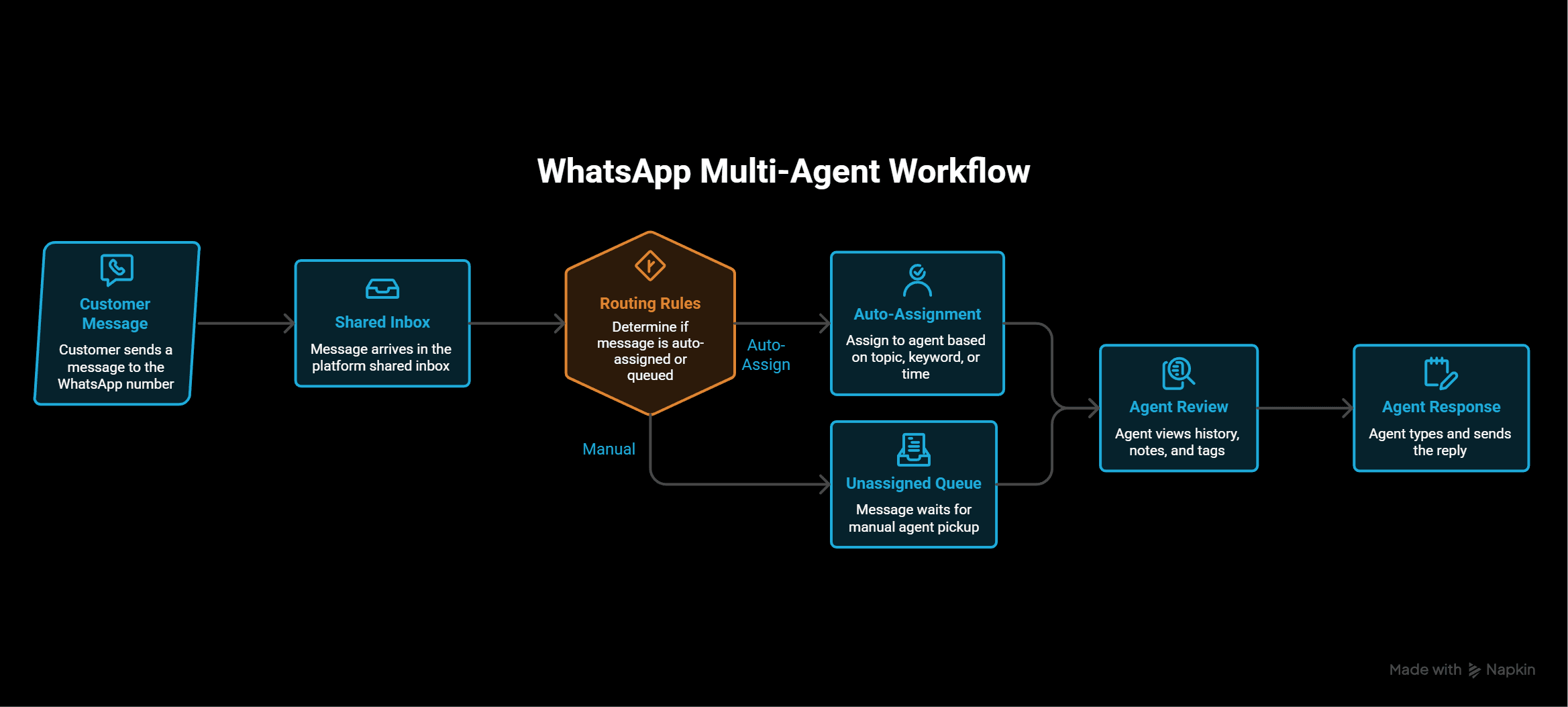
On top of that, most multi-agent platforms include a bot layer before the human handoff. A WhatsApp chatbot can collect initial information from the customer to answer questions it can handle on its own. If it runs into an issue, then it can route the conversations to the right team member. The agent who receives a routed conversation already has the context, so the first message from a human is informed rather than a blank introduction.
Every conversation carries a status: open, assigned, pending, or resolved. Managers see a live dashboard showing open conversation volume, average response times, and which agents are handling what. That visibility is what turns WhatsApp from an informal messaging channel into a measurable customer interaction engine.
Key benefits of WhatsApp multi-agents
When it comes to managing customer conversations at scale, the right multi-agent setup changes how your team works day to day. Here are the benefits that matter most.
Your whole team responds efficiently
The biggest limitation of the WhatsApp Business app is that it creates a single point of failure. When the one person managing the number is unavailable, every incoming message waits. A multi-agent setup distributes that workload so any available agent can pick up a conversation. This way, customers get a response without depending on one individual being online.
Not just that. You can route conversations to agents based on their specialization, their language, or their current availability. For example, a billing question goes to the finance team. Or a pre-sales inquiry goes to the sales team. Each conversation lands with the person best positioned to handle it, which shortens resolution time and raises the quality of every reply.
No duplicate responses
On a shared WhatsApp account managed by two or more people, the same message often gets replied to twice by different agents who both saw it at the same moment. The customer receives two responses, sometimes with conflicting information. It looks unprofessional and erodes trust fast.
A multi-agent platform prevents this with collision detection. When one agent opens a conversation to respond, the platform marks it as being handled and alerts any other agent who tries to reply simultaneously.
Combined with internal notes for team coordination, agents can hand off mid-conversation cleanly, without the customer ever noticing a transition happened.
Every conversation has a clear owner
One of the most damaging patterns in customer service is the "someone will handle it" assumption. A message arrives, three people see it, each assumes one of the others is going to respond, and it falls through the cracks.
The customer follows up two days later. By that point, the context is cold, and someone has to piece together what happened. Assignment rules and queue management built into a WhatsApp multi-agent framework prevent exactly this.
Each conversation is either auto-assigned based on rules you define or sits in a clearly visible unassigned queue that any available agent can see. Once assigned, it belongs to that agent.
You can see at a glance which conversations are pending and which have been open too long. This ensures that accountability is built into the system rather than dependent on whoever happens to check WhatsApp first.
Full customer history for every agent
When multiple people handle WhatsApp conversations through separate phones or shared credentials, customer history disappears between sessions. For instance, an agent resolved a delivery issue three weeks ago, but then a different agent picks up the next conversation with no idea that context exists, and the customer has to repeat everything from scratch.
With a multi-agent WhatsApp platform, previous resolutions are stored against the customer's profile. Any agent who opens that contact can see the full history immediately. Customers notice when they don't have to repeat themselves, and it's one of the most consistent drivers of satisfaction in high-volume support environments.
In terms of operational impact, it also speeds up resolution because the agent starts with context instead of spending the first exchange collecting information they should already have.
How to set up WhatsApp multi-agent?
Setting up a WhatsApp multi-agent system depends on which route you take. The WhatsApp Business app or the WhatsApp Business API each have different steps, with the former being easy to set up. Let’s check them out individually:
Option 1: WhatsApp Business app with linked devices
The WhatsApp Business app supports up to five linked devices on a single account. If your team is very small and your conversation volume is low, this is enough to get started without any third-party platform.
To set it up, follow these steps:
- Open the WhatsApp Business app on the primary phone
- Go to Settings and tap Linked Devices. Then select Link a Device
- Each team member scans the QR code from their own phone or computer
- All linked devices then share the same inbox in real time
That being said, this approach has hard limits. There is no conversation assignment, so anyone can reply to anything, and nobody is specifically responsible for anything.
Plus, there is no agent-level reporting, so there is no way to see who responded and when. For a team of two people handling a handful of daily conversations, it works. But once you move past that, the lack of structure creates more problems than it solves.
Option 2: WhatsApp Business API with a multi-agent platform
The WhatsApp Business API is the right setup for any team that needs proper assignment and routing. It removes the five-device cap entirely and lets you bring in as many agents as your platform supports. The setup involves these steps:
Get access to the WhatsApp Business API
You cannot access the API directly from WhatsApp. Access comes through an official Meta Business Solution Provider. The BSP handles the API connection on your behalf and provides the platform your team will actually use day to day. The first step is choosing a WhatsApp platform and creating your account.
You also need a Facebook Business Manager account and a phone number that is not already registered on any WhatsApp account. Read our guide on how to set up a WhatsApp Business account to get started with building your multi-agent WhatsApp infrastructure.
Set up your team inbox in Zixflow
With your number connected, you configure the inbox inside your platform. In Zixflow, this means going to the Inbox settings and assigning each agent a role. You then set up routing rules that define which conversations go to which agent or team automatically.
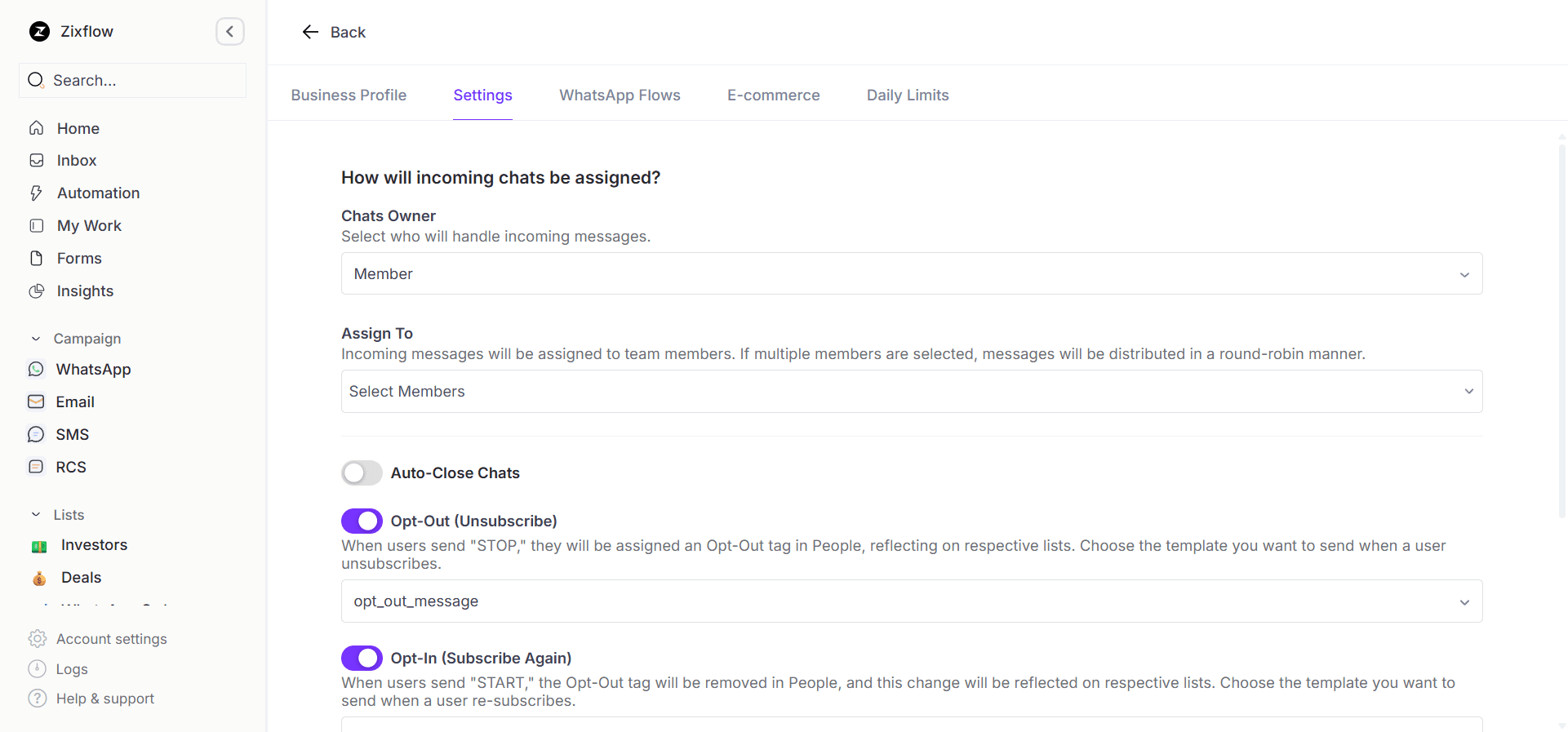
You can also configure a chatbot flow that runs before any human agent receives a conversation. The WhatsApp bot collects the customer's name, the nature of their inquiry, and any reference numbers, then routes the conversation to the right queue with that context already attached.
When an agent opens the conversation, they see the full bot exchange and can respond immediately rather than spending the first message asking for information the bot has already collected.
Go live and monitor
Once routing rules and agent assignments are in place, your team starts working from the shared Zixflow inbox rather than the WhatsApp app. Every incoming message appears in the queue and it also has the same familiar interface as WhatsApp.
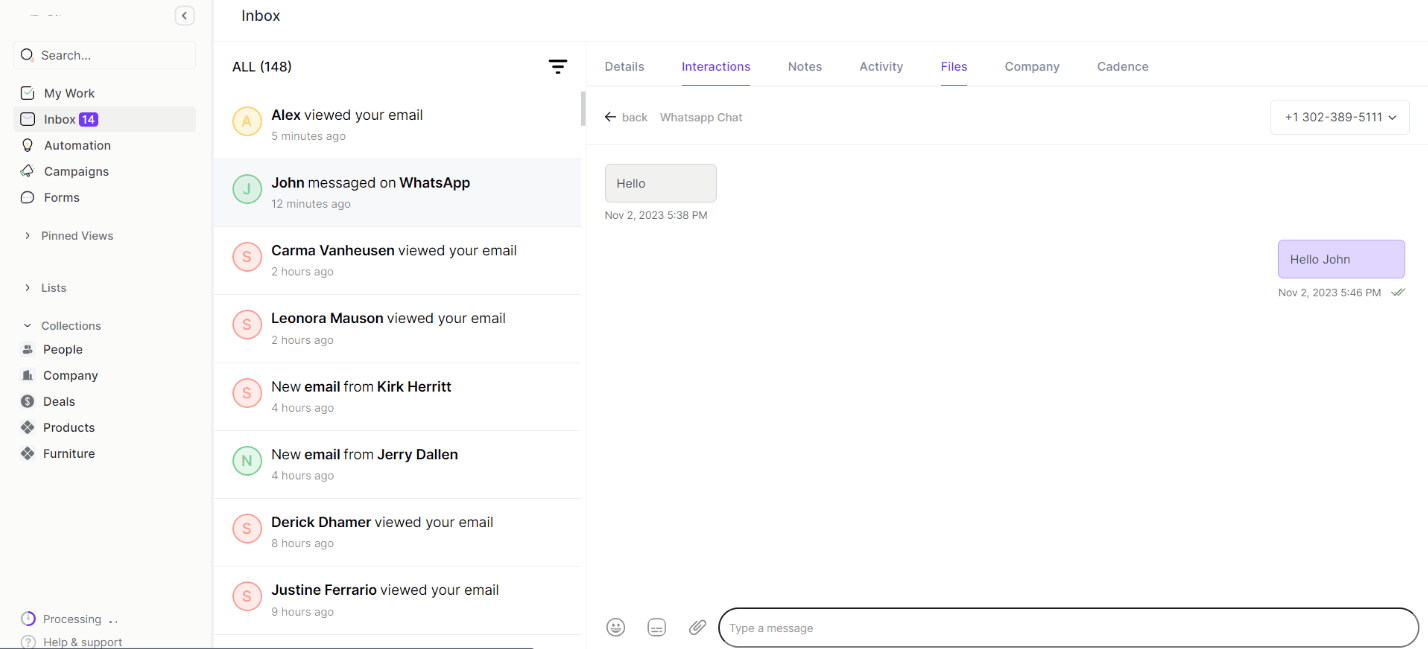
The whole setup from account creation to first live conversation typically takes two to three business days, most of which is Meta's verification process rather than any technical complexity on your end. For teams that have been managing WhatsApp through a shared phone or a single agent account, the difference in operational clarity is noticeable from the first shift.
Streamline your customer engagement with a WhatsApp multi-agent
A WhatsApp multi-agent setup solves a real operational problem. When customer conversation volume outgrows what one person can manage, the answer is not a bigger phone plan or a longer workday.
It's a platform that lets your whole team work the same number. It comes with clear ownership, full conversation history, and the routing logic to get each message to the right person fast.
The underlying principle is that WhatsApp only scales when the infrastructure beneath it matches the volume your business is generating.
If you're running conversations through WhatsApp and feeling the limits of a single inbox, now is a good time to set up a proper multi-agent system.
Zixflow gives you a shared inbox across numerous channels with conversation routing, unified customer profiles, and bot handoffs built in. You can start a free 7-day trial to see how it handles your team's conversation volume.
Frequently asked questions about WhatsApp multi-agent
What is WhatsApp multi-agent?
A WhatsApp multi-agent setup allows multiple team members to access, manage, and respond to customer conversations from a single WhatsApp Business number simultaneously.
It uses the WhatsApp Business API through a third-party platform to give each agent their own login within a shared inbox, where conversations can be assigned and tracked effectively.
It removes the single-agent limitation of the WhatsApp Business app and replaces it with a collaborative team inbox.
Can multiple agents use the same WhatsApp Business account?
The WhatsApp Business app supports up to five linked devices, but all devices share the same inbox. A proper multi-agent setup requires the WhatsApp Business API along with a BSP. The app is built for one person, while the API-powered platform is built for big teams.
How many agents can use a single WhatsApp number?
WhatsApp itself does not impose a fixed agent limit on the Business API. The limit depends on the platform you use. Most multi-agent platforms support anywhere from two agents to hundreds of agents on a single number.
This means you can start small, with just two or three agents, and scale as conversation volume grows, without ever needing to change your customer-facing WhatsApp number.
Is WhatsApp multi-agent only for large businesses?
No. Any business where two or more people need to manage WhatsApp conversations can benefit from a multi-agent setup.
A team of three support agents handling 50 conversations a day runs into the same problems as an enterprise team handling 5,000 conversations. The problems appear at any team size, and the solution scales down just as well as it scales up.
How does conversation routing work in a multi-agent platform?
Conversation routing automatically assigns incoming messages to the right agent or team based on rules you configure. Rules can be based on:
- Keywords in the customer's message
- The customer's contact tags
- Their conversation history
When no routing rule applies, the conversation lands in an unassigned queue that any available agent can claim. Most platforms combine a bot-based triage layer with routing rules, so initial context is collected before the conversation reaches a human agent.
What is the difference between a WhatsApp shared inbox and a multi-agent platform?
A shared inbox is one feature within a multi-agent platform. It's the centralized view where all incoming conversations are visible to the team.
A full multi-agent platform goes further. It involves utilizing other customer engagement aspects like adding conversation assignment rules, routing logic, internal notes, and chatbot integration.