WhatsApp Usernames and BSUIDs: What Changes for Businesses in 2026
WhatsApp usernames and BSUIDs change how businesses identify customers and manage conversations without relying on phone numbers.
 by Sahil Tyagi
A WhatsApp BSUID (business-scoped user ID) is a unique identifier that Meta assigns to each customer per business portfolio. It keeps conversations connected when customers use WhatsApp usernames instead of showing their phone number.
Supporting it is required for all businesses on the WhatsApp Business Platform and for Click-to-WhatsApp advertisers.
- BSUID: Appears in every message webhook in the user_id field and can be used to send messages since July 2026
- Usernames: Optional handles that hide a customer’s phone number. Business usernames don’t hide your business number
- What changes: Phone numbers can be missing from webhooks and BSUIDs change when customers change numbers. Authentication templates still need phone numbers
- How to prepare: Make the BSUID your main identifier for your WhatsApp messages and test webhooks for every scenario so messages don’t fail to deliver
Ever since WhatsApp launched, the phone number has been the one thing that ties a customer to a conversation. Your CRM uses it to match chats to contacts. Your support tool uses it to pull up order history, and so do your ad reports to link a lead back to a campaign.
That's starting to change.
In 2026, WhatsApp began rolling out usernames, which let users chat without showing their phone number. To make this work for businesses using the WhatsApp Business API, Meta introduced a new identifier called the business-scoped user ID, or BSUID. And supporting it isn't optional.
Meta says it's required for all businesses and partners on the WhatsApp Business Platform, as well as Click-to-WhatsApp advertisers.
If your infrastructure expects a phone number in every message, some conversations may soon arrive without one. That's why in this guide, I'll explain what a WhatsApp BSUID is and how usernames work. Then I'll walk you through what's changing on the platform and how to get your setup ready.
So, let's get into it.
What is a WhatsApp BSUID?
A WhatsApp BSUID (business-scoped user ID) is a unique identifier that Meta assigns to each WhatsApp user for each business portfolio they interact with. It lets a business recognize and message a customer even when it doesn't know their phone number. BSUIDs appear in every message webhook in a new user_id field, whether or not the customer has set up a username.
Here's what a BSUID looks like, US.13491208655302741918.
It starts with the customer's two-letter country code, followed by a period, and a string of up to 128 letters and numbers. Meta generates it automatically, so you never have to create one yourself.
Additionally, the "business-scoped" part matters a lot. A BSUID is unique to each pair of customer and business portfolios. So the same person can have one BSUID with your brand and a completely different one with another brand. This means no business can use a BSUID to follow a customer across other companies.
One exception to this is Parent BSUID Accounts. If you're using multiple separate Meta Business Portfolios, you can enroll them into a Parent BSUID Account via Meta's API. This generates a shared identifier (e.g., US.ENT.11815...) across all enrolled child portfolios, allowing a single parent company to recognize and track the same customer across its portfolios.
There's one more rule you need to know is that a BSUID is regenerated if the customer changes their phone number. When that happens, Meta sends you a system message with both the old and the new ID, so you can update your records.
WhatsApp BSUID vs. phone number vs. username
Now you might ask, how is a BSUID different from a phone number or a username? Each one plays a different role. Here's a quick comparison:
| Aspect | WhatsApp BSUID | Phone number | Username |
|---|---|---|---|
| Who sees it? | Only your business in the API data | Anyone the customer chats with, unless hidden by a username | Other WhatsApp users and businesses |
| Who creates it? | Automatically created by Meta | The customer's mobile carrier | The customer, optionally |
| Same across businesses? | No, unique to each business portfolio | Yes | Yes |
| Can change? | Yes, when the customer changes their number | Yes, if the customer switches numbers | Yes, periodically depending on customer |
| Can it be used to send messages through the API? | Yes, since July 2026 | Yes | No |
| Always in webhooks? | Yes | No, not for some username users | Only when the customer has one |
In short, the username is what the customer shows to the world. The BSUID is what your systems use behind the scenes. And the phone number is still around, just not guaranteed anymore.
What are WhatsApp usernames?
WhatsApp usernames are optional handles that people can set up so others can reach them without seeing their phone number. There are two kinds:
- Usernames for customers
- Usernames for businesses
They work a little differently, so let's look at each one.
Usernames for WhatsApp users
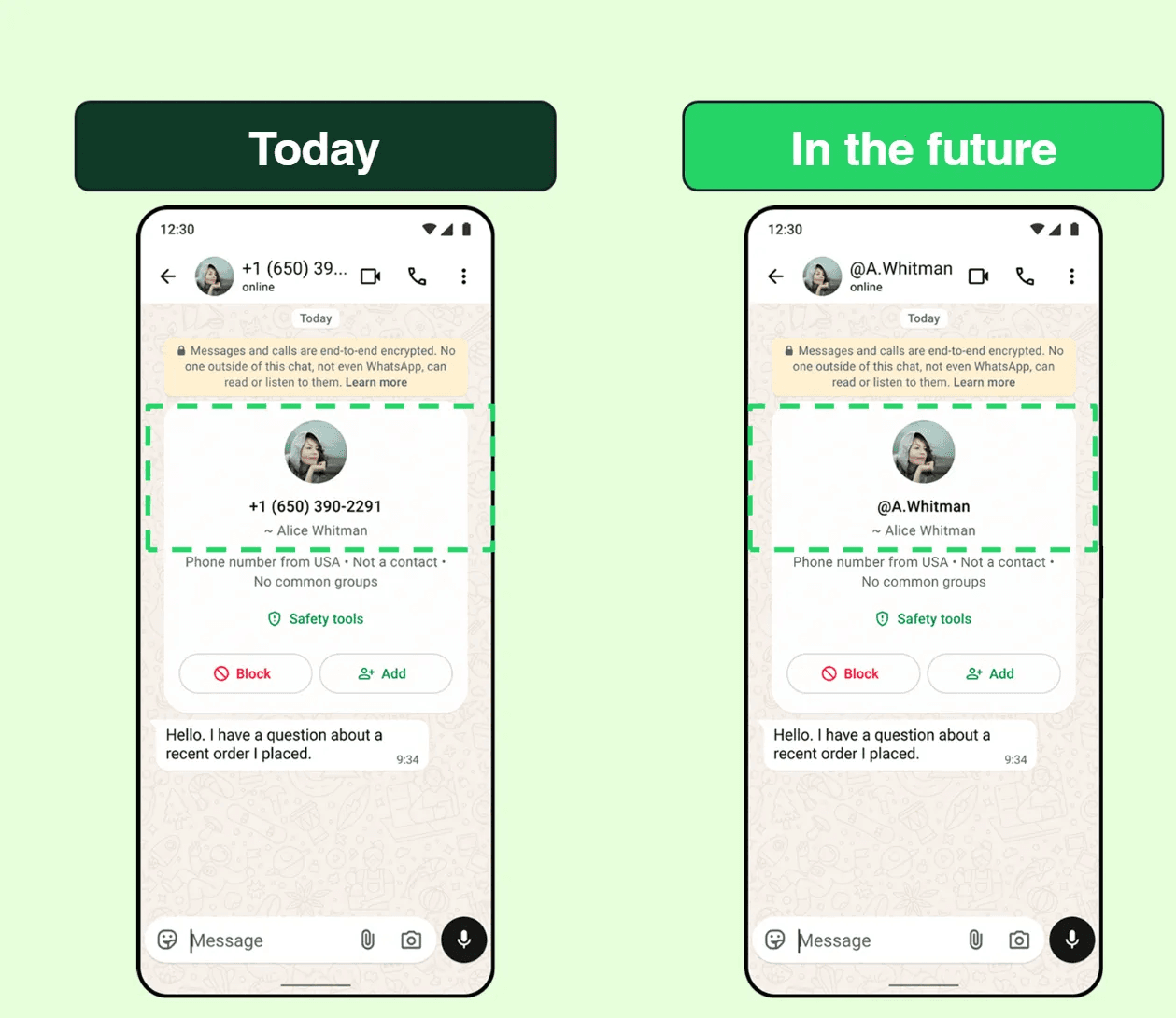
A WhatsApp user can have one username at a time. If they choose to set one up, their username is displayed instead of their phone number in the app.
Changing a username doesn't change the customer's phone number or BSUID. So your business records stay linked even if a customer picks a new handle. When a customer has a username, it shows up in a username field in their incoming messages and in your delivered and read status updates.
You can also use a customer's username to personalize messages, much like how you use their profile name today.
Usernames for businesses
Businesses can claim usernames too. But here's the key difference, a business username won't hide your business phone number. Meta is clear that business usernames are not a privacy feature.
Each business phone number can have only one username at a time, so no two WhatsApp numbers can share the same username. The format rules are fairly strict:
- Between 3 and 35 characters long
- Only English letters, numbers, periods, and underscores
- At least one letter included
- No period at the start or end, and no two periods in a row
- Can't start with "www." or end with a domain like ".com"
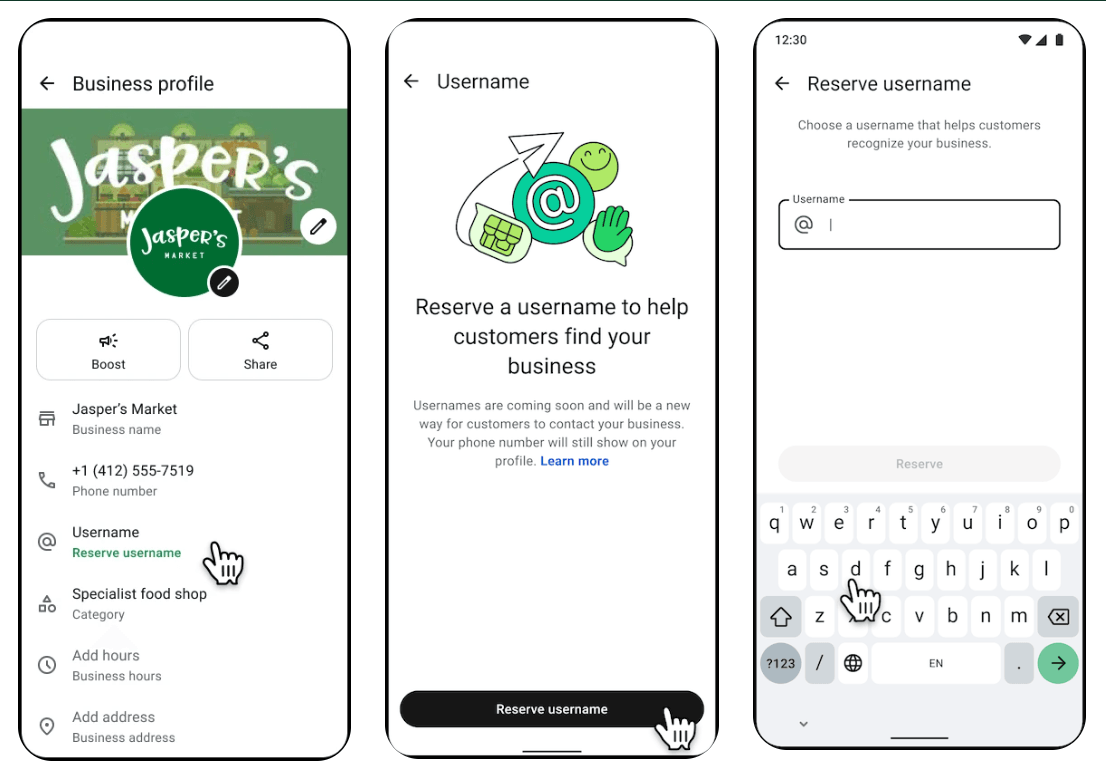
Meta started letting businesses reserve their usernames on June 29, 2026. You can claim yours through WhatsApp Manager, Meta Business Suite, or the Username API. If your reserved name is already used by your Facebook Page or Instagram account, you'll need to link your business phone number to that account first.
It also helps to know how WhatsApp decides what name to show in a chat. It follows a simple order. The name the customer has saved for you always comes first. Next is your verified or Official Business Account name. Your username comes after that, and your phone number comes last.
So if you already have a green tick on WhatsApp, your verified name still shows before your username. It's also a good moment to check that your WhatsApp display name matches your brand.
That's worth getting right because 79.3% of consumers require proof of legitimacy before engaging with a business. A clear business name and username make it easier for customers to trust that they're really talking to you.
Where does the username rollout stand?
Usernames are rolling out gradually. They're not available to everyone yet. In July 2026, WhatsApp started promoting usernames as a major update on the App Store and Google Play. At the same time, the feature went live for only a limited number of users.
In November 2026, WhatsApp was testing new privacy settings that let username users choose who can see their phone number. So expect the details to keep shifting for a while.
Having said that, let's look at what all of this means for businesses using the WhatsApp Business Platform.
What changes for businesses on the WhatsApp Business Platform?
When it comes to the WhatsApp Business Platform, most of the changes happen in the data your systems send and receive. Here are the ones that matter most:
Phone numbers can go missing from webhooks
If a customer turns on a username, their phone number won't be included in your webhooks by default. Their BSUID will be there instead.
Meta has added a safety net for existing customers, though. You'll still get the phone number if any of these is true:
- You messaged or called the customer's number in the last 30 days
- The customer messaged or called you from their number in the last 30 days
- The customer is in your contact book
However, there's a catch. The 30-day check works per business phone number. So if you talk to a customer from your support number, your marketing number won't automatically get their phone number too. For businesses that use several numbers, this is an easy detail to miss.
You can message customers using their BSUID
BSUIDs started appearing in webhooks in early April 2026. Since July 2026, you can also send messages using a BSUID.
The Messages API now has a new recipient field for the BSUID. The old to field still works for phone numbers. You can use either one or both. If you include both, the phone number takes priority.
There are limits, though. A BSUID only works with business phone numbers owned by the same business portfolio. If you try to use it from a number in a different portfolio, the message will fail. This matters for agencies and solution providers who manage numbers for several clients.
Authentication templates still need phone numbers
You can send almost any message type to a BSUID. The exception is authentication templates that use one-tap, zero-tap, or copy code buttons. These still require the customer's phone number.
In reality, this rarely causes a problem because when a customer logs in or signs up, they usually type in their phone number anyway. But it does mean your WhatsApp OTP flows should keep working from phone numbers instead of BSUIDs.
BSUIDs change when customers change numbers
When a customer switches to a new phone number, their BSUID is regenerated. Meta tells you about it through a system message on your existing messages webhook.
There are two types of these messages. One shares the new phone number when it can. The other only reports the BSUID change. Both include the previous ID, so you can link the old record to the new one.
Country information now comes from the BSUID
Many businesses read the country code from a customer's phone number. They use it for routing chats, choosing a language, or reporting by market.
If the phone number is missing, that won't work anymore. Instead, you'll need to read the two-letter country code at the start of the BSUID. It's a small change, but it can quietly break reports and routing rules if you miss out on updating them.
How to prepare your WhatsApp setup for the BSUID change?
Now that you know what's changing, it's time to act on it. I’ve mentioned the steps below in the order most teams should tackle them, with each one building on the one before it.
Make the BSUID your main WhatsApp identifier
The first step is to change how your systems identify WhatsApp contacts. Until now, the phone number has done that job. Going forward, the BSUID should.
This works because the BSUID is the one ID that shows up in every message webhook. For example, a phone number might be missing. A username might not exist. But the BSUID will always be there. If you build your matching around it, a customer with a username won't break your records.
The best way to start is with your contact database. Add a field to store the BSUID for every WhatsApp contact. Then make the phone number field optional, so a record can be saved without one.
Whenever a webhook arrives, look for a match on the BSUID first. If there's no match, try the phone number next. And if you find a match on the phone number, save the BSUID to that contact so it's ready next time.
Now if you already have years of WhatsApp history keyed by phone number, you don't need to rebuild it overnight. Most of your existing customers will keep sending phone numbers for now, because the username rollout is gradual. You can fill in BSUIDs as customers message you, and your old records will slowly sync up on their own.
Note: Be careful with BSUIDs that come from different business portfolios, as they are different for each portfolio, the same customer will have a different BSUID when contacting your different WhatsApp numbers.
If you run several portfolios, store the portfolio alongside each BSUID so you don't mix them up. Large organizations that manage many portfolios can ask their Meta contact about parent BSUIDs, which work across enrolled portfolios.
Update your webhook handling for every scenario
The next step is to make sure your webhook code can handle messages with and without phone numbers. This is where most integrations break, so it deserves careful testing.
It matters because a webhook handler that expects a phone number in every payload may fail without warning. Messages could get dropped or assigned to the wrong contact. And because usernames are rolling out gradually, the problem might only show up for a handful of customers at first.
The most practical way to test this is with Meta's built-in webhook test tool. You'll find it in your App Dashboard, under the WhatsApp configuration panel, next to your messages webhook.
It can send sample payloads for four situations. The first is a customer without a username. The second is a customer with a username and no phone number. The third is a customer with a username and a phone number. The fourth includes a parent BSUID.
Run all four through your system and check that each one creates or updates the right contact. Pay special attention to the second one, since that's the case most likely to break.
While you're at it, update how you handle system messages. When a customer changes their phone number, Meta sends a system message on your messages webhook. Make sure your code reads it, moves the history from the old BSUID to the new one, and saves the new phone number when it's shared.
Update your sending logic to support BSUIDs
Once you can receive BSUIDs, the next step is to send messages with them. This lets you reply to customers who never shared their phone number with you.
It works because the WhatsApp Business API now accepts a BSUID in the recipient field. So even if a customer reaches you through their username, you can still reply to them. You can also follow up later and send order updates. Without this change, those customers would be stuck in a one-way conversation.
The best way to approach this is to keep both options open. When you have a phone number, you can keep sending it as before. When you only have a BSUID, put it in the recipient field instead.
If you send both, keep in mind that the phone number wins. Always use the full BSUID value, including the country code and the period. Meta says that changing or shortening it will make the request fail. So store it exactly as it arrives.
Next, add handling for the new error code 131062. It means the message type you tried to send doesn't support BSUID recipients. One common reason is trying to send an authentication template. When this happens, your system should fall back to the customer's phone number if you have it or log the failure so someone can follow up.
Lastly, don't forget about your templates, either. Approved WhatsApp message templates work the same way with BSUIDs, so you won't need to resubmit them. Only the way you address the recipient changes.
Collect phone numbers where you need them
Some parts of your business will still need phone numbers. Deliveries, authentication, and voice calls are some good examples. For these, you'll need a clear way to ask for the number.
A respectful request also keeps you on the right side of WhatsApp's rules, which already require opt-in before you message customers.
The most effective way to do this is with Meta's "request contact info" button. Add it to the places where you truly need the number, such as order confirmation or account setup. Avoid adding it to every marketing template, since that's where it will feel most out of place.
Be careful not to overdo it, though. If you ask for a phone number in every chat, customers who chose a username for privacy will find it pushy. Ask once, and if they say no, you can continue the conversation without their number.
It also helps to turn on Meta’s contact book if your business relies on phone numbers. Once a customer has messaged you from their number, Meta will keep including it in your webhooks. Just keep in mind that the contact book only stores interactions that happen after it’s launched.
Review your ad tracking and reports
The last step is to look beyond WhatsApp itself. Phone numbers often travel from WhatsApp into other tools, and those tools need to be ready for BSUIDs too.
This matters most for Click-to-WhatsApp ads. When someone taps your ad and starts a chat, your system might use their phone number to link the lead to a campaign. It might also use that number to send the lead to a sales team. If that customer uses a username, the number may not be there. Meta specifically requires these advertisers to support BSUIDs for that reason.
The best way to handle this is to map every place a WhatsApp phone number goes after it enters your system. Start with your Click-to-WhatsApp ads attribution. Then move on to your CRM sync, your support tool, and your reporting dashboards. For each one, check whether it can work with a BSUID instead.
If you work with a WhatsApp API provider, bring them into this conversation early. Ask how they store BSUIDs and whether their exports include the new fields.
Finally, don't forget your internal teams as well. Let your support and sales agents know that some customers will appear with a username instead of a number. They shouldn't ask for a phone number out of habit, unless the conversation actually needs it.
Once your tools and teams are aligned, BSUIDs stop being a technical risk and become just another part of how you manage customer data.
Ready to make the move to WhatsApp BSUIDs?
WhatsApp is moving away from phone numbers as the only way to identify customers. Usernames give people more privacy, and the WhatsApp BSUID gives businesses a stable way to keep conversations connected. This guide covered what BSUIDs and usernames are and how to prepare your systems.
If you take away one thing, let it be this, treat the BSUID as your main WhatsApp identifier and the phone number as a bonus. Every other change gets simpler once your contact records are built around the one ID that's always there.
A good next step is to run Meta's webhook test tool against your current setup this week. It will show you quickly where phone numbers are hard-coded into your workflows, and that tells you where to start.
While you update your data, critical messages like OTPs still need to reach customers on time. If you run WhatsApp alongside SMS, RCS, and email, you can see how Zixflow works to keep those journeys running with automatic fallback while you plan your migration.
Frequently asked questions about WhatsApp usernames and BSUIDs
What does BSUID mean on WhatsApp?
BSUID stands for business-scoped user ID. It's a unique identifier that Meta gives each WhatsApp user for every business portfolio they interact with. It appears in the user_id field of WhatsApp Business Platform webhooks, whether or not the user has a username. Businesses can use it to recognize customers and, after July 2026, to send them messages without knowing their phone number.
Is a WhatsApp BSUID the same for every business?
No. A BSUID is unique to each pair of customer and business portfolio. The same person will have a different BSUID with every business they chat with. This is to stop businesses from using BSUIDs to track customers across other companies.
Can I still send WhatsApp messages using phone numbers?
Yes. The API still accepts phone numbers in the to field. Since July 2026, it also accepts BSUIDs in a new recipient field. You can use either one or both in the same request, but the phone number takes priority if you include both. Authentication templates still require a phone number.
Will a WhatsApp business username hide my business phone number?
No. Meta states that business usernames are not a privacy feature and your business phone number will still appear in your business profile. In chats, customers see the name they've saved for you first. After that comes your verified or Official Business Account name, then your username, and finally your phone number.
When did WhatsApp BSUIDs start appearing in webhooks?
BSUIDs began appearing in WhatsApp Business Platform webhooks in early April 2026. Meta's APIs started supporting messages sent to BSUIDs in July 2026. Businesses could start reserving usernames from June 29, 2026. Consumer usernames are rolling out gradually, so the number of customers without a visible phone number will grow over time.
What happens to a BSUID when a customer changes their phone number?
The customer's BSUID is regenerated. Meta sends a system message on your existing messages webhook to tell you. It includes the previous BSUID and the new one, and sometimes the new phone number if it can be shared. There's no separate webhook field to subscribe to, so make sure your system reads system messages and updates the contact record.
Do WhatsApp Business app users need to do anything about BSUIDs?
Not much. BSUIDs are part of the WhatsApp Business Platform API and webhooks. If you only use the WhatsApp Business app without connecting it to other software, there's no integration work for you.
You'll see some customers with usernames instead of phone numbers and you can claim a business username through the app if you'd like one.