Holiday WhatsApp Marketing: A Step-by-step Guide in 2026
Create holiday WhatsApp marketing campaigns with a clear plan for audience targeting, message scheduling, and campaign execution.
 by Sahil Tyagi
Holiday WhatsApp marketing uses the WhatsApp Business capabilities to run seasonal campaigns. It includes sale announcements, abandoned cart recovery, personalized promotions, and post-purchase follow-ups during peak holiday periods, such as Black Friday, Cyber Monday, and Christmas.
Running a holiday WhatsApp campaign requires explicit opt-in consent from every contact, Meta-approved message templates, audience segmentation by purchase history, and automated flows for continuous customer engagement.
Holiday campaigns on WhatsApp don't just outperform email in open rates; they change the entire nature of how customers interact with your brand during the most competitive sales period of the year.
Global holiday e-commerce spending crossed $1 trillion for the first time in December 2025, and over half of all holiday transactions happened on mobile devices. Brands that can reach customers where they already spend their time have a structural advantage over those still competing for attention in a promotional email folder.
Additionally, according to a YouGov study commissioned by Meta, 57% of festive season shoppers in APAC communicated with a business via messaging around festive season sales, and 72% of those shoppers intentionally waited for discount events before making purchases.
That shift in buyer behavior means the window for influence is shorter, the competition for attention is higher, and the channel that wins that attention often determines who captures the sale.
That's why in this guide, I'll walk you through exactly how to plan your holiday WhatsApp marketing campaigns. I’ll go over various aspects, starting from building your opted-in list to setting up automation flows. So, let's jump into it!
What is holiday WhatsApp marketing?
Holiday WhatsApp marketing is the practice of using the WhatsApp Business API to plan and execute customer communication campaigns during seasonal shopping periods, such as Black Friday, Cyber Monday, Diwali, and Christmas.
It covers sending WhatsApp broadcasts to eligible contacts, personalized promotional messages, automated cart abandonment recovery flows, catalog-based product promotion, and two-way support conversations, all running from a single verified WhatsApp Business account.
What sets holiday WhatsApp marketing apart from email or SMS campaigns is the conversational layer. WhatsApp messages arrive in the same thread as personal conversations, which creates a sense of proximity that traditional channels can’t quite replicate.
Also, customers can reply, ask questions, and browse your product catalog without leaving the app, which shortens the path from interest to purchase considerably.
On the other hand, a poorly timed or irrelevant message in someone's personal messaging app doesn't just get ignored, it gets reported as spam, which can damage your quality rating and limit your ability to send messages when it matters most.
Getting the execution right on WhatsApp matters more than on most other channels, and this guide is designed to help you do exactly that.
Why is WhatsApp a go-to channel for holiday marketing?
When it comes to holiday marketing, most teams already run email, paid social, and SMS programs. WhatsApp earns its place not by replacing those channels but by filling the gaps they leave, particularly around visibility and conversation quality.
Guaranteed visibility during peak competition
WhatsApp messages achieve open rates of close to 98%, compared to 20 to 25% for email. During the holiday season, when the average consumer's inbox holds dozens of promotional emails from competing brands, WhatsApp messages cut through because they arrive in a personal messaging thread rather than a promotional folder.
For a Black Friday sale launch, that visibility difference isn't marginal. It's often the difference between your campaign being seen within minutes and being discovered three days after the sale ends. The open rate advantage compounds during flash sales and limited-time events, where timing is everything.
Two-way conversations to convert leads
Unlike email or SMS, WhatsApp is built for dialogue. When a customer receives your holiday offer, they can ask a question or request a product recommendation in the same thread, without calling the support or navigating to a different channel.
This conversational dynamic is particularly valuable during peak season when buying intent is high, but patience for friction is low.
For instance, a customer who receives a Christmas gift guide and can immediately ask 'Is this available in blue?' and get an answer within minutes is far more likely to complete the purchase than one who has to email support and wait.
Rich media brings promotions to life
WhatsApp supports images, videos, PDFs, and product catalogs natively, which means your holiday campaigns can show rather than just tell. A Black Friday sale product sent as a rich product catalog, a Christmas sale countdown video, or a curated look-book of seasonal bestsellers drives higher engagement than a plain text message with a link.
Rich media messages also perform better when customers share them with family and friends, extending your campaign reach without additional spend.
This kind of format flexibility matters most for product-led businesses. When a customer can see exactly what they're getting, with product images, pricing, and a one-tap purchase link, the conversion path gets meaningfully shorter.
Automated cart recovery to recapture revenue
Cart abandonment rates during the holiday season are brutal. Research from the Baymard Institute shows an average abandonment rate of 70.19% overall, with December pushing that figure to 74.8% and Cyber Monday reaching 80.25%.
WhatsApp abandoned cart recovery messages, triggered automatically within minutes of an abandoned cart, recover 18 to 23% of abandoned carts compared to 8% for email.
For a team doing $1 million in holiday revenue, a 15-point improvement in cart recovery rate is a six-figure revenue impact from automation that runs without any ongoing manual effort. That's one of the clearest ROI arguments for setting up WhatsApp automation before the holiday season starts.
How to run a holiday WhatsApp marketing campaign?
Now that you have a solid understanding of why WhatsApp works for holiday campaigns, here is how to actually run one. These steps are sequenced deliberately: skipping ahead or reordering them is the most common reason well-intentioned teams end up scrambling during peak season.
Build your opt-in lists before the season starts
Your holiday campaign is only as strong as your WhatsApp opt-in contact list. The WhatsApp Business requires explicit opt-in consent from every contact before you can send proactive messages.
You cannot send a marketing broadcast to someone who hasn't given you permission, and attempting to do so risks your account to spam reports and quality rating penalties. This means building and verifying your list well in advance of your first campaign date is a prerequisite, and not something you think about a week before.
Start collecting WhatsApp opt-ins at least six to eight weeks before your first holiday WhatsApp campaign. Use multiple collection points simultaneously. For example, a checkbox on your checkout page, a dedicated landing page offering WhatsApp early access to holiday deals, pop-ups on high-traffic product and category pages, and click-to-WhatsApp ad campaigns on Meta platforms that capture opt-ins while the customer is already in a buying mindset.
For each opt-in, the consent language must clearly identify that the customer is agreeing to receive WhatsApp messages from your brand.
Once your list is collected, audit it before the campaign launches. Remove undeliverable numbers and verify opt-in status for any contacts imported from older sources. After that, segment contacts into lists by product interest. This clean, well-tagged list is what makes meaningful personalization possible at the scale holiday campaigns require.
Plan your campaigns around key holiday dates
The holiday season is a series of overlapping sales moments with different audiences and purchase motivations, not a single event. For instance, a mid-market D2C brand might plan campaigns around Diwali in October, Singles Day in November, Black Friday, Cyber Monday, Christmas, and New Year sales in December. Each of these initiatives require its own strategy.
Build your holiday campaign calendar at least a month before your first send date. For each sale event or holiday, map out three things:
- The campaign objective (sale announcement, last-day urgency, cart recovery, post-purchase follow-up)
- The audience segment being targeted
- The message sequence from first touch to follow-up
This planning exercise also tells you exactly how many WhatsApp marketing templates you need to create and submit for approval, which feeds directly into the next step.
Get your message templates approved early
Every proactive WhatsApp message sent through the Business API must use a Meta-approved WhatsApp message template. The review process for standard templates typically takes a few hours, but templates with complex variables, rich media, or custom button configurations can take longer.
Templates submitted with errors get rejected and require resubmission, which can push your launch date if you're cutting it close.
So, create your holiday messaging templates at least two to three weeks before your planned launch dates. For each campaign, you'll typically need four template types:
- A sale launch announcement
- An abandoned cart recovery message
- A last-chance urgency message
- A post-purchase follow-up
Understanding the types of WhatsApp messages is important here. Marketing, utility, and authentication templates are categorized and priced differently, and submitting a template in the wrong category is one of the most common reasons for rejection.
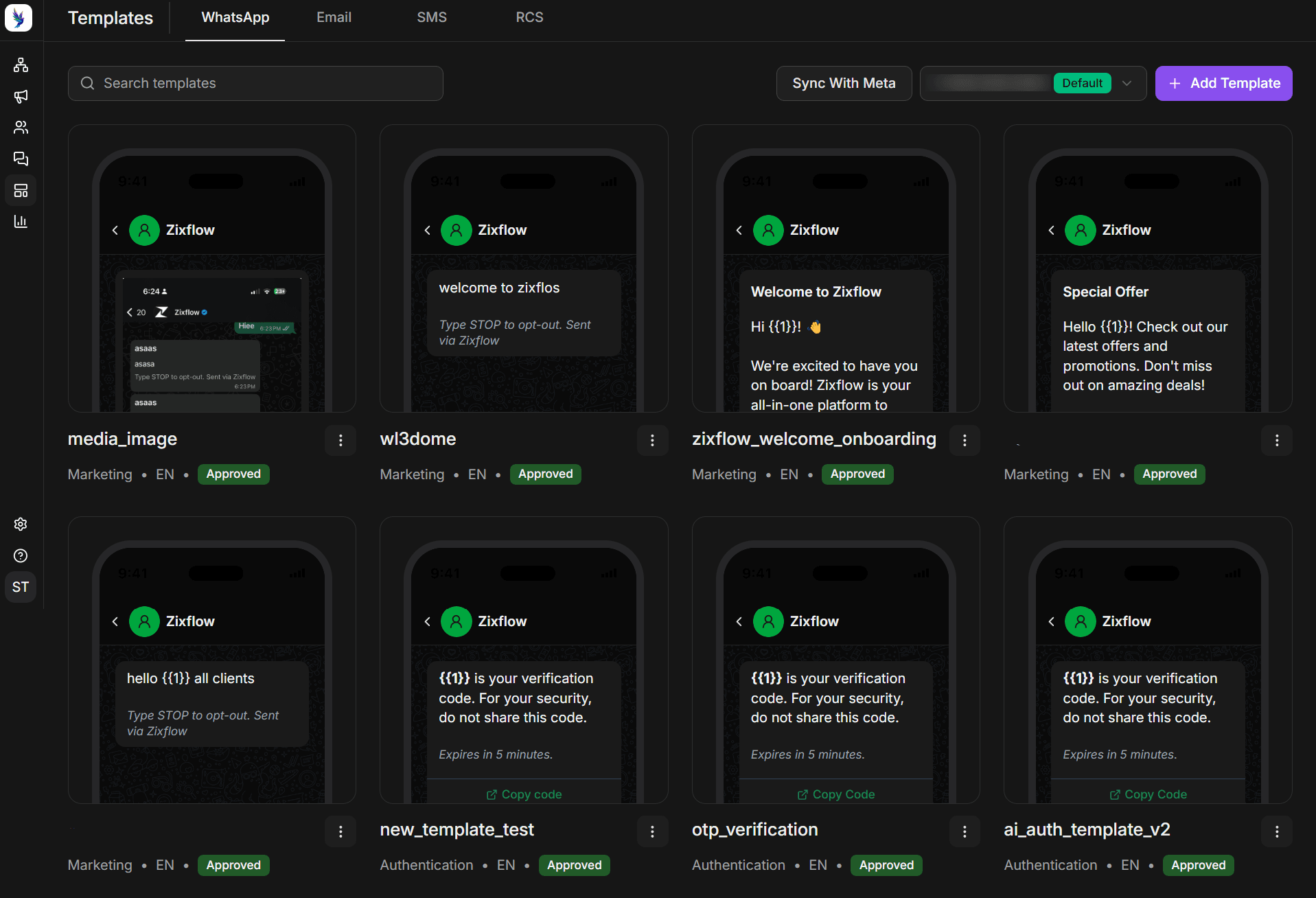
Every marketing template must include a Marketing Opt-Out button, which has been required on all marketing templates. Build this button into your template designs from the start, not as an afterthought.
Templates submitted without it are rejected automatically, and a rejection five days before Black Friday, when your queue is already tight, is an avoidable problem.
Segment your audience for relevant campaigns
Sending the same message to your entire contact list during peak season is one of the fastest ways to ramp up marketing costs with nothing to show for it. Customers have different purchase histories and product preferences. So treating them all the same wastes the data you already have about them.
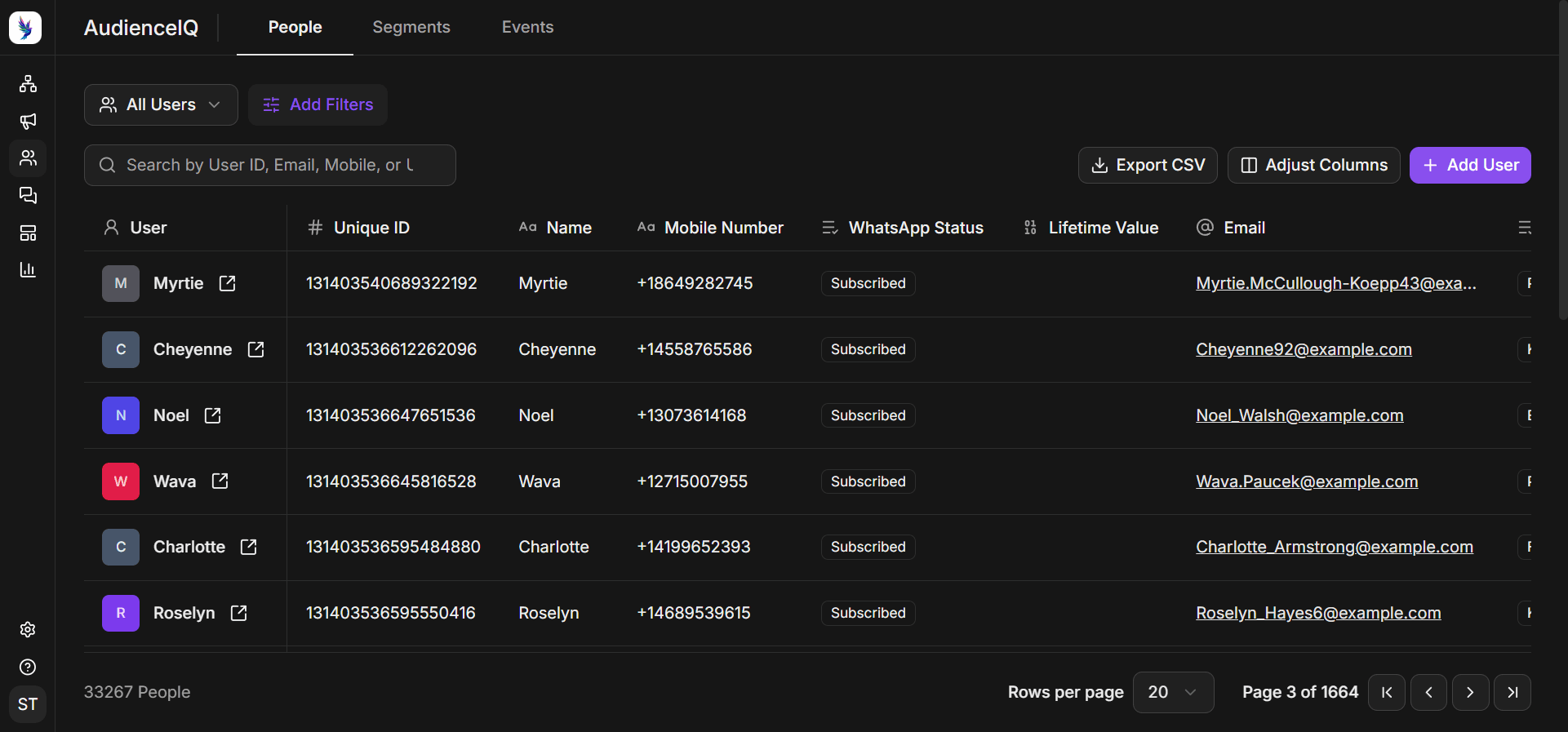
Segment your contact list before each campaign using at least three criteria: purchase recency, purchase value, and product category interest derived from browsing or purchase history.
These three dimensions let you build meaningful audience groups. VIP customers with high lifetime value get early access to the sale with exclusive offers before it goes public.
Recent purchasers get cross-sell recommendations based on what they already own. Lapsed customers who haven't bought in 90 or more days get re-engagement campaigns with a stronger discount to bring them back into the purchase cycle.
Set up automated flows for cart recovery
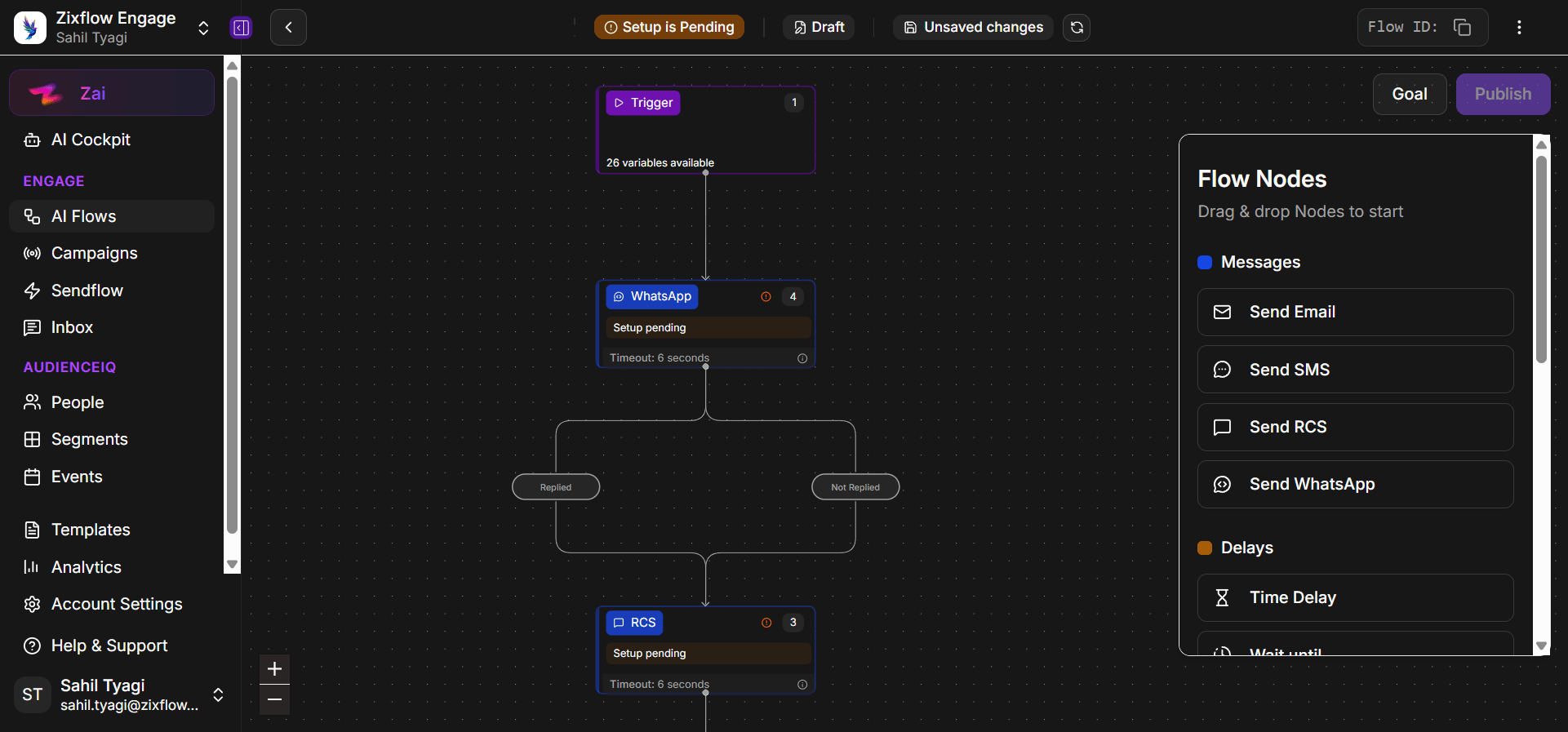
The highest-value WhatsApp automation flows during the holiday season are triggered by customer behavior, not scheduled by your team. Rather than manually tracking who abandoned a cart or who clicked a campaign message without buying, automation fires the right follow-up message at the right moment based on what the customer actually did.
Set up your automation flows before the holiday season starts. The three flows every holiday campaign needs are:
- An abandoned cart recovery sequence
- A post-purchase flow covering the order confirmation or shipping update
- Delivery follow-up and a re-engagement sequence for contacts who received your broadcast but didn't click through
Each of these runs without any manual intervention from your team once it's configured, which means your automation is working at 2 AM on Black Friday morning while your team sleeps.
The setup time investment for these flows is front-loaded but one-time. Once configured, the same flows can run for every holiday campaign with minor adjustments to the message content and timing.
Teams that treat automation setup as a one-off investment rather than a per-campaign task get compounding returns from it across multiple peak seasons. If you're new to this, the WhatsApp chatbot and automation use cases guide covers the most common flow patterns and what they're designed to accomplish.
Some of the common holiday WhatsApp marketing mistakes to avoid
Most holiday WhatsApp campaign failures aren't caused by bad creative or weak offers. They're caused by operational mistakes that compound under the pressure of peak season timelines. Here are a few common ones to avoid:
Submitting templates too late
Holiday campaign timelines always feel longer in planning than in execution. Teams that submit templates one week before their campaign launch date routinely find that a template was rejected for any of the reasons that I mentioned above. When that happens, you end up losing days to the resubmission process.
The fix is straightforward. Build a template buffer of at least a month or two before every major campaign date, and test templates in a staging environment before submitting to Meta. Every day of delay during peak season is a day your competitors are in your customers' inboxes.
Broadcasting to incomplete contact lists
Sending to numbers that haven't given explicit opt-in consent isn't just a policy violation. It drives up your spam report rate and can restrict your daily messaging limit exactly when you need it most.
Before every major send, audit your list by verifying opt-in status for every contact, removing duplicates, and flagging numbers that generated delivery failures in previous campaigns. A cleaner list consistently outperforms a large unverified one, both in campaign performance and in platform health.
Treating WhatsApp like an email blast channel
The biggest strategic mistake mid-market teams make is applying email campaign logic directly to WhatsApp. Email tolerates higher frequency and more generic messaging because the channel expectations are different.
They do not expect their personal messaging app to fill up with promotional content. I would recommend a frequency of a maximum of 2 to 4 WhatsApp messages per customer per week during peak season. Above that frequency, message fatigue can kick in and make potential customers lose interest.
Going dark after the campaign without a follow-up plan
A holiday campaign that drives a spike in conversations but has no follow-up plan leaves significant revenue on the table.
Customers who asked questions but didn't complete the purchase, who received a cart recovery message but didn't convert, and who engaged with your content but didn't click through are all candidates for a follow-up sequence.
Map your post-campaign follow-up flows before the campaign launches, not the day after it ends. The follow-up window for holiday campaigns is short, and the teams that execute it within 24 to 48 hours of the original campaign tend to capture a meaningful share of deferred purchase intent.
Enhance your holiday WhatsApp marketing to the next level
Holiday WhatsApp marketing has moved from an experimental tactic to a mainstream channel for mid-market and D2C brands running seasonal campaigns at scale.
I have explained to you the steps that separate well-executed holiday campaigns from expensive opt-out events. The most important thing to carry forward is the lead time requirement. Every step in this guide takes longer than expected the first time, and the cost of being late compounds during the holiday season.
Start your holiday WhatsApp program at least six to eight weeks before your first campaign send date. Use that time to build your list, get your templates approved, and test your automation flows with a small segment before going full scale.
When the sale day arrives, you should be monitoring a plan you've already validated, not building one under pressure.
So, if you’re looking for a platform that handles every aspect of WhatsApp marketing along with a shared team inbox to handle conversations efficiently, you can start a free trial of Zixflow or talk to our team if you need assistance with launching your first holiday campaign on WhatsApp.