How to Change RCS to SMS on Android & iPhone (2026 Guide)
Step-by-step guide to switch from RCS to SMS on Android devices and iPhone (iOS 18+). Includes troubleshooting for when RCS won't turn off.
 by Sahil Tyagi
To turn off RCS and revert to SMS, go to your messaging app settings and turn off RCS. On Android (Google Messages), tap Settings → RCS Chats → Turn off "Turn on RCS chats". On iPhone (iOS 18 or higher), go to Settings → Apps → Messages → RCS Messaging → toggle off.
This will send all your messages as SMS. This will be applied instantly, but you will need to restart your phone for the setting to save.
Rich Communication Services messaging (RCS) is rapidly gaining popularity in the mobile marketing industry. So much so that it is slowly replacing the traditional SMS channel. Even though it offers advanced communication features like group chats, read receipts, and media-rich messaging, some users may prefer to switch back to the classic SMS format.
However, as powerful as RCS is, it may not always be the best fit for every user. There are various reasons why people might want to switch back to the simplicity of SMS (more on this below.)
So, if you have also noticed issues with your messaging or simply want to receive straightforward text messages, you might be wondering how to turn off RCS for your mobile device.
For that reason, in this quick guide, I will walk you through the process of how to revert back to getting SMS even when your Android phone supports RCS. But before I tell you these steps, let’s understand what RCS is and some of the common reasons for switching back to SMS.
What is RCS?
RCS, as I said before, is a communication protocol developed to take the place of SMS and MMS. It comes with modern conversation features like media-rich messages, typing indicators, read receipts, and group chats.
RCS uses internet connectivity to send and receive messages. This is different from the cellular network required by traditional SMS. Additionally, RCS requires both you and the receiver to be on a compatible device and network to work properly.
With the launch of RCS Universal Profile 4.0, RCS now supports video calling and enhanced media capabilities to make it a robust communication channel that can stand on equal footing with other messaging apps.
Plus, businesses have started using RCS marketing as a channel to reach out to their audience to drive business communications and provide a tailored engagement experience. Having said that, let’s take a look at some of the reasons why switching back to SMS.
RCS vs. SMS: What’s the difference?
Before you decide to switch from RCS to SMS, it is useful to get a sense of how these channels really operate before getting into the reasons as to why messages occasionally fail to send in RCS mode and revert to SMS mode.
RCS messaging
Think about sending a text with the ability to see the recipient typing, get high-quality pictures, and even respond to messages with emojis without switching out of your native messaging app. That is what RCS can bring to a conversation.
Moreover, RCS builds upon the standard texting feature, including capabilities you otherwise would get with third-party apps, such as WhatsApp or iMessage. With RCS, you can:
- Send high-res photos and videos directly
- Check read receipts
- Watch typing indicators
- Create RCS group chats
The best part of using RCS is that all this comes in the native messaging application of your phone. RCS, however, requires an active connection to the internet to work effectively.
SMS
SMS is not a new concept, and it remains one of the most reliable channels for communication.
It is a powerful tool because of its simplicity. SMS is compatible with practically any mobile phone and does not require an internet connection, only a cellular network. Although it is not modern, it is fast, simple, and free to use.
This reliability has made SMS a widely used communication channel, particularly in areas with unreliable internet connectivity.
That said, here are some common aspects of comparison for RCS and SMS:
| Aspect | RCS (Rich Communication Services) | SMS (Short Message Service) |
|---|---|---|
| Message capabilities | Supports rich media messages, like images, videos, GIFs, carousels, & buttons | Only supports plain text content |
| Character limit | Much higher limit, usually 1,000+ characters depending on the provider | Limited to 160 characters per message |
| Internet connectivity | Requires constant mobile data or Wi-Fi | Works without the internet. Uses cellular network only |
| User experience | Similar to WhatsApp or iMessage with typing indicators and read receipts | Basic messaging with no advanced messaging features |
| Read receipts | Yes | No |
| Typing indicators | Yes | No |
| Branding options | Businesses can create a verified business profile to show brand name, logo, and description | No branding options available. Only the Sender ID is visible |
| Availability | Depends on device, carrier, and country support | Works on every mobile phone globally |
| Cost structure | Usually slightly higher than SMS but offers much richer engagement | Generally cheaper and more widely used |
| Group chat support | Up to 100 participants with full features | Limited group MMS, no reactions or read receipts |
| Cross-platform messaging | Yes (after the launch of iOS 18) | Yes (always) |
| Reactions and emojis | Native tapback reactions supported | No reactions; emojis sent as text only |
| Encryption | End-to-end encryption rolling out via GSMA's MLS protocol | None |
Why switch from RCS to SMS?
Although RCS offers a lot more features compared to SMS, here are some common reasons why you might want to disable RCS:
Network compatibility issues
The biggest reason why one might think of using SMS over RCS is the fact that RCS is not as reliable as SMS. Since it’s not explicitly clear whether RCS requires both internet connectivity and carrier support, its adoption has been slow.
On top of that, similar to Apple’s iMessage, which lets iPhone users communicate with each other, RCS needs both sender and receiver to have compatible devices. If this is not the case, then your RCS message will be delivered as an SMS instead.
International messaging
Another situation where SMS might have RCS at beat (at the moment), is international messaging. RCS may not work properly with international numbers, making SMS a more reliable option for cross-border communication.
Since RCS relies on the data network and carrier support, sending messages to users in different countries can be unpredictable. This is because not all international carriers support RCS and it can lead to disruption in message delivery.
Battery and data usage
RCS uses an internet connection to send and receive messages. Which can quickly drain your phone's battery and consume mobile data. This is particularly problematic if you are in a situation where Wi-Fi is not available, or if you are trying to conserve battery life.
On the other hand, SMS uses the carrier's cellular network without needing an internet connection, it can be a more energy-efficient and data-saving option, particularly if you are sending a lot of messages throughout the day.
Personal preference
Lastly, some people might prefer the simplicity of SMS over the added features of RCS. While RCS enables you to have more feature-rich engagement, not everyone needs these extra capabilities.
If you prefer the straightforwardness and no-frills communication experience of SMS, then switching to SMS might be a better option for your personal messaging style.
Thinking of getting a separate solution for RCS and SMS?
Not anymore! Sign up with Zixflow and get not only RCS, but WhatsApp, SMS, and email from one single suite.
Talk to SalesHow to switch from RCS to SMS?
The exact process of switching to SMS from RCS varies slightly depending on your app and phone. Here are the most common scenarios: Google Messages on Android and iPhone (iOS 18 or later).
How to switch from RCS on an Android?
Open your messaging app. On most Android phones, this will be Google Messages, the default app for RCS. Tap on the account option in the top-right corner to open the drop-down menu. From this menu, select Settings.
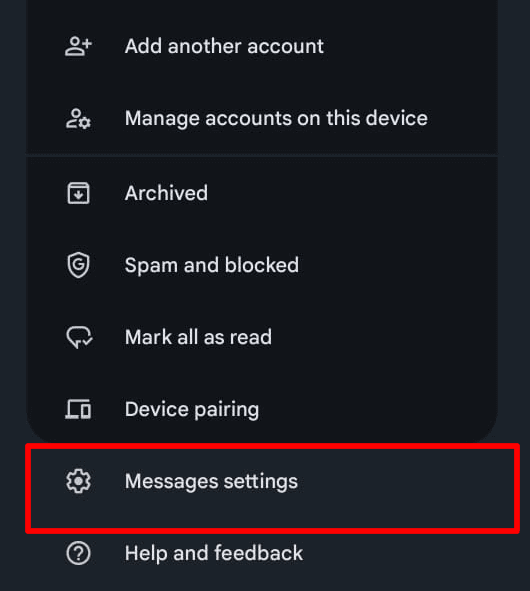
In the Settings menu, click on the Chat Features. This is where the RCS functionalities are managed.
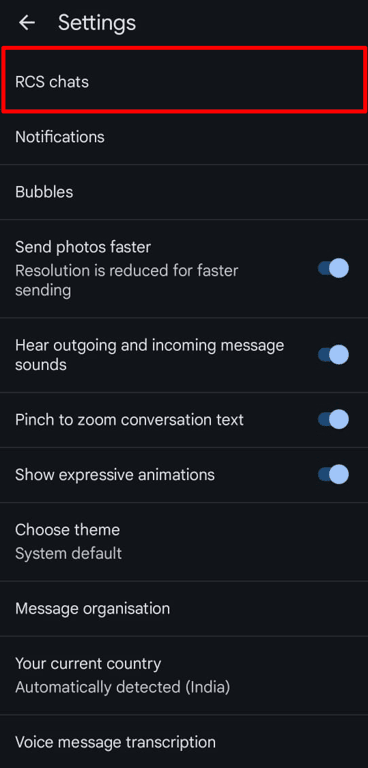
For the RCS Chat option, toggle off the switch next to disable it. This will disable all RCS-related features and make it so that you will only receive SMS.
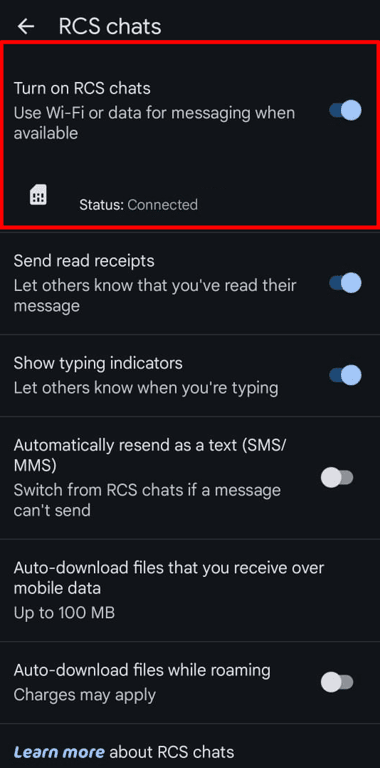
While this is not necessary, rebooting your device ensures that the changes take effect properly.
How to turn off RCS on an iPhone?
After the introduction of RCS by Apple with iOS 18, iPhone users can receive RCS messages using their native messaging app. Here are the steps to switch from RCS:
- Open the Settings app
- Scroll down and tap Apps
- Tap Messages
- Tap RCS Messaging
- Toggle off RCS Messaging
You will use only SMS, MMS, or iMessage (between Apple devices) on your iPhone. You'll receive RCS messages from non-Apple users as SMS.
How to turn off RCS in Samsung Messages?
In case you are using a Samsung phone with Samsung Messages instead of Google Messages, then follow these steps:
- Open the Samsung Messages application
- Click menu (top-right) 3 dots, then go to Settings
- Tap Chat settings
- Toggle off RCS chats or Chat features
- Restart your device
Keep in mind that Samsung devices have a tendency to default to using Google Messages. When you are unsure about which app you are using, check by long-pressing the app icon. Samsung Messages has a yellow/blue chat bubble icon, and Google Messages has a blue speech bubble.
What to do if RCS didn’t stop working after turning it off?
If you notice that you are still receiving RCS messages after switching it off, try the following troubleshooting steps:
- Restart the messaging app by force-closing it
- Restart your phone
- Clear the Google Messages cache by going to Settings → Apps → Google Messages (or your messaging app) → Storage → Clear cache
- Check your network carrier's RCS settings. Some carriers, particularly in India, like Jio or Airtel, have their own RCS configurations that need to be turned off. Check the carrier's app or call support
- Reset network settings by navigating to Settings → System → Reset → Reset network settings. Note, this also resets Wi-Fi networks
Cost consideration for RCS and SMS
To the average user, RCS and SMS are usually cheap and come as a part of their mobile plan. If you want to reach out to your customers as a business and are considering using RCS or SMS, the trade-offs are:
- RCS for business provides verified branding, rich media, carousels, and CTA buttons, but is only available via a Google-partnered RCS provider. It is more expensive per message and only reaches recipients with RCS-compatible devices
- SMS is guaranteed to reach every recipient, easier to implement, and cheaper. However, it lacks modern messaging capabilities, and plain text is limited to only 160 characters per message
RCS messaging tools, such as Zixflow, allow you to run RCS campaigns with SMS fallback. So you can send RCS when it is supported and SMS automatically for devices that don't support RCS. You don't have to pick one.
If you are looking for a provider, check out our list of the best RCS providers.
Still want to engage customers via traditional SMS marketing?
With Zixflow, you can send plain text messages at a cheaper cost or design a multimedia one to have enhanced interactions over RCS.
Run Campaigns TodaySwitch back to simpler communication with SMS
Switching from RCS to SMS can be a simple process, but it’s important to weigh the benefits and drawbacks before making the change.
While RCS offers richer communication features, it may not be ideal in all situations. SMS, though basic, is more universally supported and works without requiring network compatibility or an internet connection.
By following the steps outlined in this guide, you can easily toggle between RCS and SMS based on your needs.
Frequently asked questions about switching from RCS to SMS
How do I turn off RCS on my iPhone?
For iOS 18, go to Settings → Apps → Messages → RCS Messaging → turn off RCS. iOS 17 and earlier don't support RCS, so there's nothing to disable.
Why won't my RCS turn off?
It is likely due to app caching. Restart your phone and force close the messaging app. If this does not work, delete the app's cache, and then check if your carrier also has an RCS layer that needs to be switched off separately.
Will switching to SMS delete my message history?
No. The messages you have will remain. Any new messages will be sent and received via SMS instead of RCS.
Will the people I text know I switched to SMS?
Yes, but only indirectly. They won't get any typing indicators, and read receipts will no longer work. They won't receive a message that you switched off RCS.
Can I switch back to RCS later?
Yes. Simply head back to your messaging app's settings and switch RCS chats on again. It may take a few minutes to turn back on and some providers may send an SMS to verify your phone number.
Does turning off RCS affect iMessage on iPhone?
No. iMessage is a separate Apple service for messages between Apple devices. Turning off RCS only affects how your iPhone communicates with non-Apple users, as those messages will go as SMS instead of RCS.
Can I have RCS on for some contacts and off for others?
No. RCS is a global setting. You cannot selectively enable it per contact. If you need to send SMS to one specific person, you would have to toggle RCS off, send, and toggle it back on.
Does my carrier need to support RCS for me to use it?
Yes. Even if your phone supports RCS, your carrier must support the GSMA Universal Profile for RCS to work. Most major carriers in the US, India, and Europe support this in 2026, but some smaller regional carriers might not yet.